
CH 20 · 插件三形态:函数 / 对象 / 类
本章目标
CH 19 我们写的是插件最常用的一种写法。这一章把插件的三种形态(函数、对象、类)一次性讲透:它们各自长什么样、什么时候用哪种,以及类形态为什么是"开一个公共窗口"——它是插件之间互相协作的关键。看完这章,你就知道一个插件该用哪种形态写,而不是只会套一种模板。
三种形态先看全貌
一张表先兜个底,细节下面逐个拆:
| 形态 | 长什么样 | 一句话理解 | 什么时候用 |
|---|---|---|---|
| 函数 | export function apply(ctx) {} | 你自己去办一件事 | 默认选择,九成情况够用 |
| 对象 | export default { name, inject, apply(ctx) } | 名字和流程打包带走 | 想给插件带点静态声明 |
| 类 | export default class extends Service {} | 开一个公共窗口,谁都能来办事 | 要让别的插件调用你的能力 |
记住一个判断就够:只给 Agent 加能力用函数;要让别的插件依赖你,用类。对象形态夹在中间,功能上基本等于函数,只是多了个 name 等静态元数据。
函数形态:你已会了
CH 19 写的 hello-plugin 就是函数形态:
export function apply(ctx) {
  // 在这里注册你的能力
}
框架加载插件时调用 apply(ctx),把上下文交给你。绝大多数插件——注册工具、监听事件、挂定时器——这一种就够了。在你确定要被别的插件依赖之前,永远先写函数形态。
对象形态:名字和流程打包
对象形态就是把 name、inject、apply 放进一个对象里一起导出:
export default {
  name: 'my-plugin',
  inject: ['tools'],
  apply(ctx) {
    // 这里 ctx.tools 一定可用
  },
}
它和函数形态几乎等价,区别只是把静态声明(名字、依赖)和 apply 组织成一份"打包好的说明书"。什么时候用?当你的插件希望一眼看清"我是谁、我要用哪些服务、我干什么"时,用对象更整洁。功能上没有函数形态做不到的事。
类形态:当插件要"提供服务"
这一节是本篇的重点。先建立一个概念:
服务(Service)是挂在
ctx上的命名能力。 你每天都在用服务——ctx.tools(工具)、ctx.llm(模型)、ctx.agents(子代理)都是服务。任何插件都可以提供自己的服务,供其他插件调用。
函数/对象形态是"自己去办事";类形态是开一个公共窗口,谁都能来你这里办事。打个比方:函数形态像你跑一趟办事大厅办自己的事;类形态像你在大厅里开一个窗口,别人(别的插件)来你窗口递单子、拿结果。
提供方:写一个 Service 子类
import { Service } from '@deepseek-ai/cordis'

export default class MetricsService extends Service {
  constructor(ctx) {
    super(ctx, 'metrics')  // 注册一个叫 metrics 的服务
  }

  record(event, value) {
    console.log('[metrics]', event, value)
  }
}
两个关键点:
extends Service+super(ctx, 'metrics'):把metrics这个名字挂到ctx上,别的插件就能ctx.metrics访问它。record(event, value)是这个服务对外提供的方法——别人调用ctx.metrics.record(...)就会走到这里。
消费方:inject 声明依赖
export const name = 'consumer'
export const inject = ['metrics']

export function apply(ctx) {
  ctx.metrics.record('plugin_loaded', 1)
}
inject: ['metrics'] 声明"我要用 metrics 这个服务"。框架保证:apply 执行时,inject 声明的服务一定已经就绪。如果服务还没准备好,你的插件会等着,不会提前跑。
一张图看懂协作关系
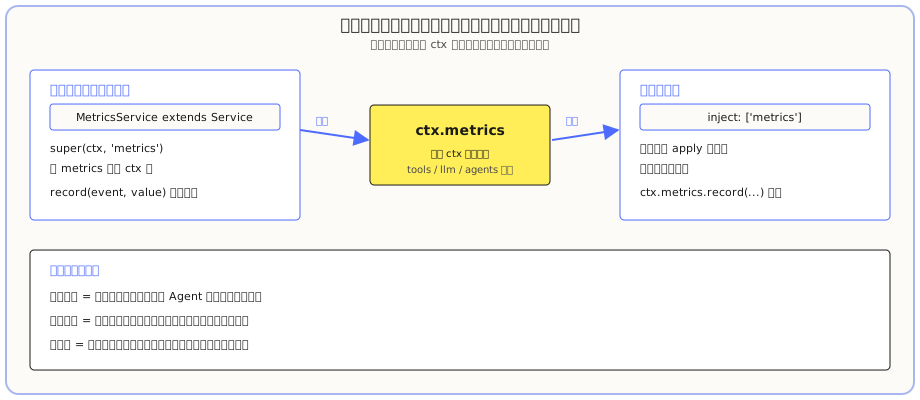
提供方把服务挂到 ctx 上,消费方声明依赖后直接调用。tools、llm、agents 这些内置能力,本质就是同一套机制——你在用它们的时候,就是"消费方"。
动手:让两个插件真的对上话
前面都是概念。下面亲手写一个提供方和一个消费方,让它们真的通上话。在一个你想放插件的工作区里(先 cd 到那里)建目录:
New-Item -ItemType Directory -Path "service-demo\src" -Force第 1 步:给插件目录装依赖
类形态要 import 框架的 @deepseek-ai/cordis 包。你的工作区里没有它,直接加载会报 Cannot find package '@deepseek-ai/cordis'。所以先进插件目录把它装上:
cd "E:\software-workspace\DeepSeek harness demo\service-demo"   # 换成你自己的目录
npm init -y
npm install @deepseek-ai/cordis
装完改一下 package.json,给根对象加一行 "type": "module"——否则 Node 每次加载插件都要先猜模块格式,打一堆 warning:
{
  "name": "service-demo",
  "version": "1.0.0",
  "type": "module"
}
第 2 步:写提供方
新建 service-demo\src\provider.js:
import { Service } from '@deepseek-ai/cordis'

export default class MetricsService extends Service {
  constructor(ctx) {
    super(ctx, 'metrics')
  }

  record(event, value) {
    console.log('[metrics]', event, value)
  }
}
第 3 步:写消费方
新建 service-demo\src\consumer.js:
export const name = 'consumer'
export const inject = ['metrics']

export function apply(ctx) {
  ctx.metrics.record('plugin_loaded', 1)
}
第 4 步:声明并验证
新建 service-demo\cordis.yml(路径换成你自己的,注意空格要写成 %20):
- insert:
    - id: provider
      name: 'file:///E:/你的工作区/service-demo/src/provider.js'
    - id: consumer
      name: 'file:///E:/你的工作区/service-demo/src/consumer.js'
用 headless 快速验证:
cd 你的工作区目录
dsh --profile headless --patch "./service-demo/cordis.yml" "只回复:hi"
输出里你会看到:
[metrics] plugin_loaded 1
hi
[metrics] plugin_loaded 1 就是消费方调到了提供方的方法——你的两个插件真的对上了话。至此,函数、对象、类三种形态,你都亲手验证过了。
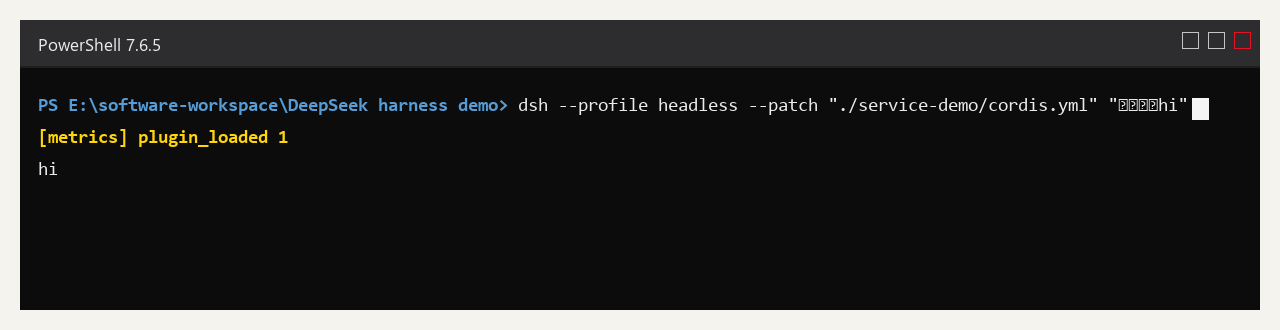
终端输出里黄色的那行 [metrics] plugin_loaded 1,就是消费方通过 ctx.metrics.record(...) 调到了提供方的方法——两个插件真的对上了话。
让 dsh 自己搭:一条提示词搞定
上面这些目录、依赖、两个文件都是你手动建的。老规矩,写插件这种活 dsh 自己也能干——而且它比你更熟"服务该怎么定义、依赖该怎么注入"。
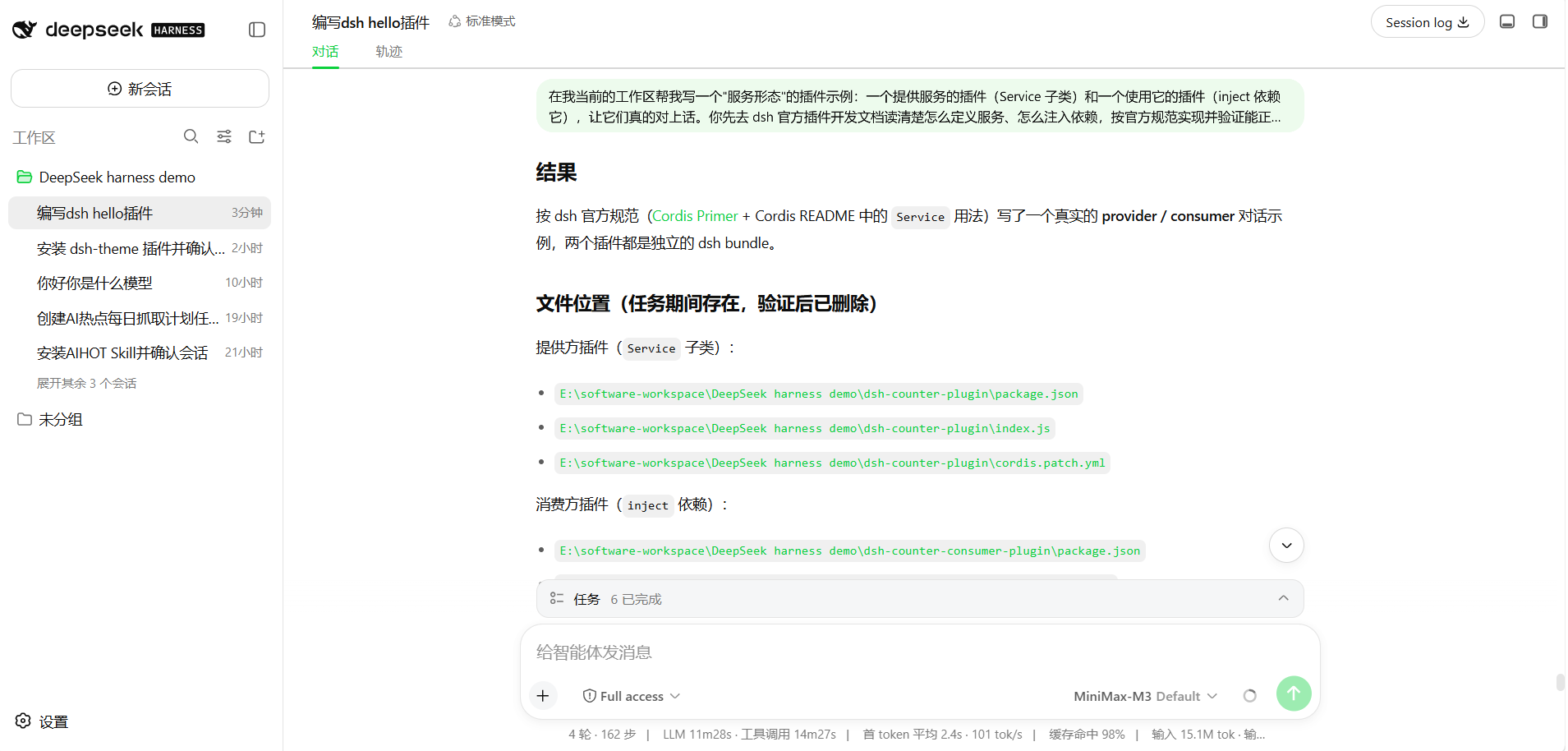
直接在 Web UI 的输入框发这条提示词:
在我当前的工作区帮我写一个"服务形态"的插件示例:一个提供服务的插件(Service 子类)和一个使用它的插件(inject 依赖它),让它们真的对上话。你先去 dsh 官方插件开发文档读清楚怎么定义服务、怎么注入依赖,按官方规范实现并验证能正常加载调用,最后告诉我结果和文件放在哪。它会自己去查官方文档、自己装依赖、自己写两个插件、自己验证能不能对上话。你只负责验收它写出来的东西。
常见坑
| 问题 | 怎么回事 | 怎么处理 |
|---|---|---|
报 Cannot find package '@deepseek-ai/cordis' | 插件目录没装依赖 | 在插件目录 npm install @deepseek-ai/cordis |
一堆 MODULE_TYPELESS_PACKAGE_JSON 警告 | package.json 没声明模块类型 | 加 "type": "module" |
| 消费方拿不到服务 | 服务名对不上 | 检查 super(ctx, 'xxx') 里的名字和 inject: ['xxx'] 完全一致 |
| 类插件加载报错 | 没 extends Service 或没调 super | 类形态必须继承 Service 并 super(ctx, '服务名') |
ctx.metrics 是 undefined | 消费方没声明 inject | 在消费方写 export const inject = ['metrics'] |
这一章你学到了什么
能自己完成下面几条,就算过关:
- [ ] 能说出三种形态各自长什么样、什么时候用哪种
- [ ] 知道服务 = 挂在
ctx上的命名能力,tools/llm/agents都是服务 - [ ] 会写一个
Service子类当提供方,super(ctx, '名字')注册服务 - [ ] 会写一个
inject消费方,apply里直接ctx.服务名.方法()调用 - [ ] 知道类形态插件要先在插件目录装
@deepseek-ai/cordis依赖