CH 02 · Meet dsh
Chapter Goal
This chapter has no commands and no environment to set up. It clarifies three things: what dsh is, what it can do, and how it differs from a model or tools like Claude Code. By the end you'll be ready to install it in CH 03.
What Is dsh
In one line: dsh is the Agent runtime framework DeepSeek open-sourced on August 13, 2026. The command name is dsh, the full name is DeepSeek Harness, the license is MIT, and the official positioning is developer preview.
The homepage says it in a single line — Everything is a plugin. The official equation:
Agent = Model + Harness
In plain words: the model does the thinking, the Harness does the work. A model only generates text; Harness is what lets a model read files, run commands, call APIs, manage context, and plan — connecting the model to the real world so tasks can actually get done.
Don't Mistake It For
The easiest pitfall: treating dsh as "an AI coding assistant".
It's not. Claude Code, Codex — those are coding assistants. They are finished products: tools, Skills, sessions, and sandbox are all wrapped in one shell; the wall cannot be torn down, the layout cannot be changed. dsh is an "execution substrate": coding is just one preset combination, and you can completely assemble Agents unrelated to programming.
Another pitfall: dsh is not a model. DeepSeek V4 flash (and the vision-enabled V4 flash vision exp) — those are models. dsh is the "operating system layer" that lets the model do work; they are not the same thing. And in dsh, the DeepSeek model is only the default pre-installed plugin — you can swap in any other model.
Four Keywords to Know It
1. Everything is a plugin. Model, tools, Skill, session, sandbox, storage, loop, scheduler, UI — every capability is a plugin (a Lego brick), and you can swap, delete, or add them.
2. The base layer is Cordis. The Cordis kernel handles plugin mounting, unmounting, and dependencies. Plugins coordinate through services and events; anyone can join in, no one is privileged.
3. Every run is traceable. Everything the model sees gets written into an append-only session log: system prompts, reasoning, tool calls and results, subagent scheduling, every context injection. Browse by source in the Trajectory view. This means observable, auditable, reproducible — important for research and production.
4. Four runtime modes. Don't be put off by the names: they aren't four engines but four official preset plugin-combination templates — and you can define new ones yourself:
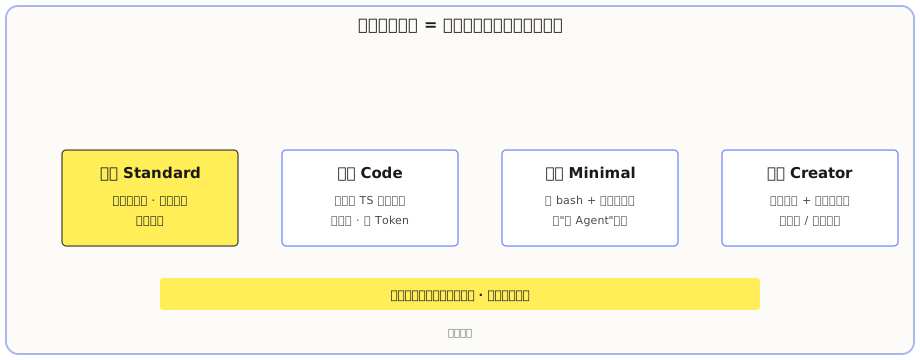
- Standard: the default for new users. Full code Agent capabilities: file editing, Shell, file/web search, Skills, plans, goals, subagents, workflows. Ready to use out of the box.
- Code: everything Standard has, plus tools exposed via the SDK so the model can write a TypeScript program and orchestrate multiple steps in one pass. Five model roundtrips of "read, search, filter, parallel-call" can potentially collapse into one program execution, saving tokens and reducing latency. The cost is dependence on the model's code ability and harder debugging; beginners should stay away.
- Minimal: only persistent bash + a file editor. Not for daily development — it's for running "naked Agent" benchmarks to compare the raw strength of two models without any fancy tools.
- Creator: everything Standard has, plus one extra: it can inspect the running Cordis environment, experiment with plugins in memory, create new Agents and plugins, and even modify itself.
Newcomers should just pick Standard. Switch to Code when you face heavy repetitive tool calls and want to compress roundtrips. Don't use Minimal for daily work — it lacks pieces and will make you question your life choices.
Who It's For, and Who It's Not
These lines are the community's assessment from real testing, not the official position.
Suited for: developers and AI enthusiasts who want to study the plugin mechanism and assemble their own execution environment; teams who need to embed Agent capabilities into their own systems — the plugin model is a ready-made substrate; Agent researchers — the trajectory feature is naturally suited for reproducible experiments; individual users who want to use off-the-shelf Agents for daily chores — community plugins already cover image recognition, Office document reading/writing (Excel/Word/PPT), browser automation, multi-Agent teaming, etc. The gaps the official team hasn't filled, the community has mostly closed.
Think twice if: you don't want to tinker with plugins at all and just want double-click-and-go — dsh is not quite there yet. The official default only loads the minimum toolset (Shell, file read/write, code editing, web search); for image recognition, Office, and browser automation you have to install plugins yourself. And the official team explicitly warns that this is a developer preview with breaking changes, updated daily. If you want peace of mind, wait until the default capabilities are fleshed out and the ecosystem settles.
What you learned in this chapter
You pass if you can complete the items below:
- [ ] Explain in your own words what dsh is, and what Harness does in
Agent = Model + Harness - [ ] State the difference between dsh and a "coding assistant" like Claude Code (one is a finished product, one is a substrate)
- [ ] Name the four runtime modes and know which one beginners should use (Standard)
- [ ] Name at least one key characteristic of dsh (everything is a plugin / built on Cordis / every run is traceable)