
CH 09 · Plugin Tree Mental Model: Everything is a Plugin
Chapter Goal
CH 02 said "everything is a plugin"; this chapter turns that into a mental model you can take away: what a running dsh actually is, why every part can be swapped, and why the line "swap a Provider, swap the product" actually holds.
A Line to Set the Stage: A Running dsh = a Plugin Tree
The official architecture doc puts it this way: a running dsh is a plugin tree, composed from ordered layers at startup. Break it into three layers to remember, and the whole architecture stands:
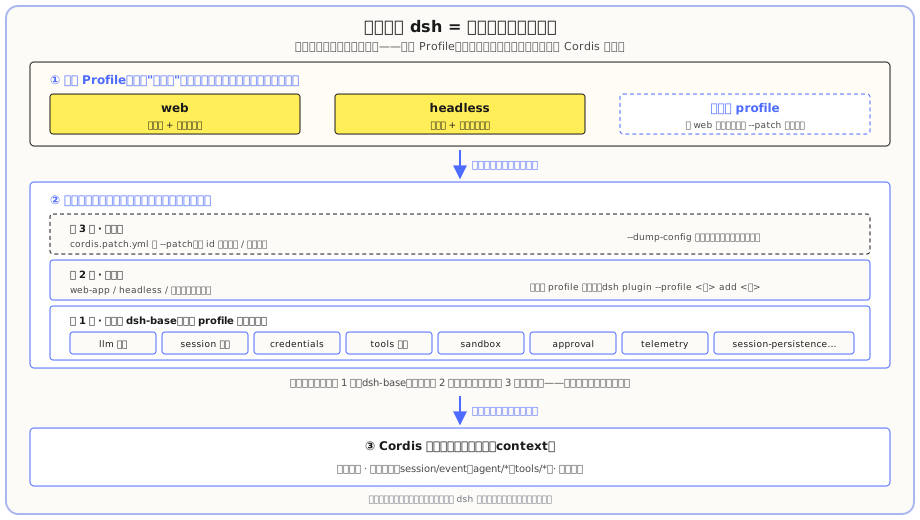
Reading top to bottom in the diagram, the logic is: ① First pick a Profile → ② Stack plugin layers in order → ③ All layers run on the same Cordis kernel. The three corresponding points:
- The bottom layer is the Cordis kernel: a shared context that lets plugins inject services, broadcast events, and mount effects.
- In the middle is the plugin tree itself: various plugins stacked into a tree, each doing one specific thing.
- The top layer is the Profile: it doesn't add new capabilities, just decides "what this tree looks like" — web, headless, or your own custom combination (covered in the next section).
Cordis: The Framework That Drives Everything
dsh runs on a plugin framework called Cordis (the official README explicitly says "powered by Cordis"). Cordis has only three core conventions:
- Plugins inject services into a shared context. Want to add a capability? Write a plugin and register it.
- Plugins broadcast typed events. Others listen to these events to coordinate, no need to directly import them.
- Plugin registration is a reversible effect — when a plugin unloads, what it registered automatically rolls back, leaving no mess.
The most important part is the last one — it's why "everything is a plugin" can hold: dsh has no privileged core to patch. The model adapter is a plugin, the tool registry is a plugin, the session log is a plugin, even the agent main loop itself is a plugin. The way to extend dsh is "hang a plugin beside it", not "go edit some core file". This makes your cost of change extremely low: if you can't change it, swap it; if you can't swap it, add one.
How does this differ from the rest? Put the two most-used CLI Agents side by side, the difference jumps out:
| Comparison | Extension approach | Can you touch the "skeleton"? |
|---|---|---|
| Claude Code | Tools can be extended (MCP, skills), but model and main loop cannot be swapped | Half-open: tools can be added, but model adaptation, session, agent loop are welded in, and the model is locked to its own ecosystem |
| Codex | Tools can be extended, but model and main loop cannot be swapped | Half-open: tools can be added, but model adaptation, session, agent loop are welded in, and the model is locked to its own ecosystem |
| dsh | Hang a plugin beside, change config to swap | Fully open: even session log, agent loop, model adapter are plugins, no privileged core |
One-line summary: Claude Code's and Codex's "skeleton" is welded in; dsh's "skeleton" is also a plugin. That's why you can plug in any model (CH 07's Codex comparison is the example), and you can swap the session for your own implementation — the skeleton itself is replaceable, the only limit is whether you want to change.
See a Real Tree from --dump-config
Saying theory ten times is not as good as one real look. In CH 06 you ran dsh --profile headless --dump-config once; what gets printed is a long tree of @deepseek-ai/dsh-* plugins — llm (model), session (session), credentials (keys), session-persistence-jsonl (session persistence)... these plugins each handle their own thing, stacked together into a runnable dsh.
The official team lists the core plugins clearly; each corresponds to a "big branch" on a tree:
| Core plugin | What it handles |
|---|---|
core/session | Append-only session log (everything the model sees is recorded) |
core/system-prompt | How the system prompt is assembled, how tool schemas are packaged |
core/tools | Tool registry and controlled execution pipeline |
core/agent | Agent interface and live registry |
core/agent-loop | Default "request → tool call" loop driver |
llm/llm | Messages and streaming vocabulary + model adapter seam |
Note "seam" in the last line — that's the next key concept.
Profile and Bundle: How Plugins Combine into a "Mode"
Plugin = a dish (egg fried rice, house soup, side); bundle = a meal set (rice, main, utensils pre-packed); profile = the menu card (lists which dishes, in what order); the wok in the back kitchen is the Cordis kernel from the next section.
What a tree is made of is decided by the Profile — think of it as the menu card in your hand:
- Profile is a named combination, stored in your Harness directory. It lists which Bundles to stack, which extra plugins to install, and also keeps your own
cordis.patch.yml. The card doesn't cook dishes, it just says "what's in this meal": the official factory ships withwebandheadlessmenu cards ready to use; the "four runtime modes" from CH 02 are four different plugin-combination presets underneath, equivalent to a few more cards. - Bundle is a distribution format for "a group of plugins + the config they mount", equivalent to a pre-packed meal set:
dsh-baseis the first layer for every profile (foundation: model, tools, persistence, sandbox, approval, settings, keys, telemetry);web-appadds "dine-in environment" to the base set (browser interface);headlessadds "takeout" (one-shot command line, no server).
First a point that's easy to mix up: Profile is not a plugin. A plugin is "something that does work" (a dish); Profile is just "the card" (only orders, doesn't cook). Picking "Minimal mode" doesn't install any new plugin — it just swaps the plugin tree to a more minimal combination — different card, same kitchen.
Plugin stacking has a strict order (official), like the kitchen prepping by the card, and later notes can override earlier ones:
Each bundle (in the order listed in the profile)   ← meal set first
→ profile's own cordis.patch.yml                    ← notes on the card
→ Harness-directory-level one                       ← boss's uniform requirements
→ command-line --patch overlay                      ← temporary extra notes, latest wins
Each layer can override the one above — patches locate a row by id, replace its entire config, or insert a new row. So CH 06's --patch isn't "an extra hole", it's openly modifying this tree: any line printed by --dump-config can be replaced by your own patch.
Building your own Profile doesn't mean writing code from scratch — the essence is "copy a card and modify it":
- Want less than web? → Copy the web config and remove what you don't want ("dine-in, but no soup");
- Want more than headless (e.g. default to mounting a tool plugin you wrote)? → Copy headless and add a line to its bundle list ("takeout, plus a side dish you brought");
- The lightest is don't change the card, only add notes: to install a plugin into an existing profile, use
dsh plugin --profile <name> add <package>("add a side dish to the existing card"), to temporarily override, use--patch("this meal note: swap the soup for Sprite") — we've seen both in CH 06.
String the loading process into a single timeline, and everything before lands:
- At startup, dsh first reads the Profile you picked — it's a loading manifest, saying "in what order do I stack which layers";
- Load layer by layer in manifest order: first layer 1 base (dsh-base), then layer 2 addition (web-app / headless / your plugins), finally layer 3 override (cordis.patch.yml +
--patch) — the later the load, the more it can override the earlier; - All layers install onto the same Cordis kernel, where they inject services and communicate with each other.
A closing line: Profile = order of ordering at startup; plugin tree = dishes installed in that order; Cordis = the wok used to install the dishes.
Events and Capability Seams: How Plugins Talk
Plugins don't import each other; they coordinate through two things:
Events are extension points, in three domains:
- Session events: persistent facts, appended to the log and broadcast, surviving restarts (e.g. "this message has been sent").
- Agent events (
agent/*): carry the live Agent, used to observe or intercept running work (e.g. "intercept before this step starts"). - Capability events (
fs/*,tools/*,telemetry/*): attach policies and adapters to a seam without changing the main loop.
Capability seam is a replaceable capability; it has three fixed roles:
- Service Definition: declares what the interface looks like;
- Service Provider: actually implements it;
- Consumer: uses it (usually tools the model calls).
Why "swap a Provider, swap the product"? Because the file system and subprocess providers share the same "execution world" — point them at a remote sandbox, and Bash, PTY, LSP all move with them, no need to write a separate set for each capability. Same goes for the model adapter: whichever adapter is registered on ctx.llm is the model the whole product uses; nothing else needs to change.
The Mental Model in One Line
If you can only take three sentences, remember these three (together with the small restaurant above):
- dsh has no core — every part is a plugin, including itself; add a dish on the side, pull one out and it auto-rolls-back.
- Profile decides what the tree looks like — web / headless / custom are all different "menu cards" of the same tree; it doesn't work, only orders.
- Events and seams are the interface for plugin collaboration — mount it and it works, pull it off and it rolls back, so swap or add freely; swap a Provider, swap the product.
What you learned in this chapter
- [ ] State that "a running dsh = a plugin tree" and that it's composed from ordered layers
- [ ] State Cordis's three core conventions (service injection / events / reversible effects), and why there's no privileged core
- [ ] Recognize core plugins (llm / session / credentials / tools, etc.) in the output of
--dump-config - [ ] Explain the relationship between Profile and Bundle, and the layer order of plugin stacking
- [ ] Use the "ordering" analogy to explain the relationship between plugin / bundle / profile, and know that building your own profile is "copy a card and modify", while
plugin add/--patchis the lightest modification - [ ] Name the three roles of a capability seam (Definition / Provider / Consumer), and explain why "swap a Provider, swap the product"