
CH 07 · Configure Model and Reasoning Effort
Chapter Goal
Get the two knobs "which model" and "how much to think" set right: first understand the three things a model call needs (API Key / Base URL / Model ID), then read the config file, change the default model, adjust the reasoning effort, and finally learn to plug in third-party models.
First Understand Three Concepts: API Key / Base URL / Model ID
Regardless of what tool you use to call a large model, one request carries three things — API Key (who you are), Base URL (where to go), Model ID (which model to use):
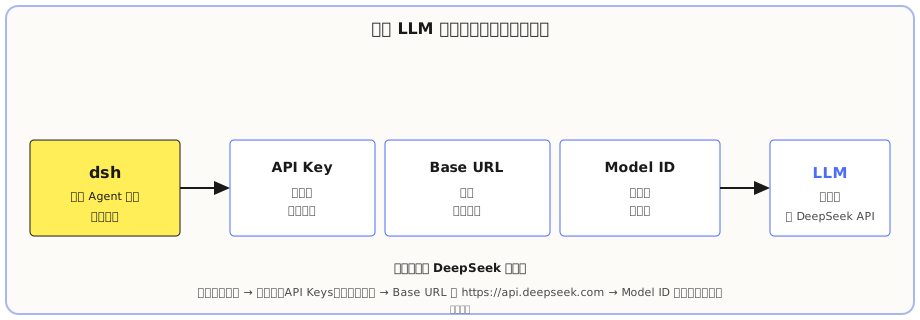
Let's break them down one by one:
- API Key: a
sk--prefixed string, your "ID card" on a model platform. The request carries it so the platform knows who you are and whose account to bill. It's a password — don't leak it, don't commit it to a Git repo. Side note: thesk-prefix is a common format across the OpenAI-compatible ecosystem; DeepSeek and many domestic platforms and self-built gateways all follow this format. - Base URL: the model's "address", i.e. the API service endpoint. All requests go to this address.
- Model ID: the model's name, specifying exactly which one to use. If the request says
deepseek-v4-flash-vision-exp, you use the vision version;deepseek-v4-prois the flagship.
These three values all come from the model platform itself, not invented by dsh. Take DeepSeek as an example, how to get them:
- API Key: open the DeepSeek Open Platform, register and log in, go to Console → API Keys → Create API key, name it and click create, immediately copy and save — the key is shown in full only at the moment of creation, after that the page only shows a redacted descriptor.
- Base URL: the official DeepSeek docs state clearly that the OpenAI-compatible endpoint is
https://api.deepseek.com(the Anthropic-compatible endpoint ishttps://api.deepseek.com/anthropic). - Model ID: find it in the model list in the official API docs; it's the same ones you saw in the model selector (
deepseek-v4-pro/deepseek-v4-flash/deepseek-v4-flash-vision-exp).
When you plug in third-party models later, you'll find it's the same three things — just with different values.
Where Is the Config File: $DSH_HOME/settings.yaml
dsh's global config is a single file: C:\Users\<your-username>\.dsh\settings.yaml. On my machine it looks like this:
ui-onboarding:
  welcomeNoticeVersion: 2026-08-13.1
agent-default-model:
  provider: deepseek-official
  model: deepseek-v4-flash-vision-exp
  reasoningEffort: high
This file is the landing point for model and reasoning-effort changes you make in the Web UI — whatever you change in the UI ends up being written here. Each of the three fields handles one thing:
| Field | Role | My value |
|---|---|---|
provider | Which provider to route through | deepseek-official (DeepSeek official) |
model | Default model for new sessions | deepseek-v4-flash-vision-exp |
reasoningEffort | Default reasoning effort | high |
How to Choose Among the Three Models
The official DeepSeek adapter publishes three models by default, each with a 1M token context window:
| Model ID | Positioning |
|---|---|
deepseek-v4-pro | Flagship, complex, quality-critical tasks, more capable but pricier |
deepseek-v4-flash | Fast, economical, for daily tasks |
deepseek-v4-flash-vision-exp | Vision version: can read images, see screenshots; on par with flash for pure text |
One detail: the Model ID is passed through to the protocol as-is, so when the official team releases new models, you don't need to re-register — just fill the new ID in the config.
Reasoning Effort: off / low / high / max
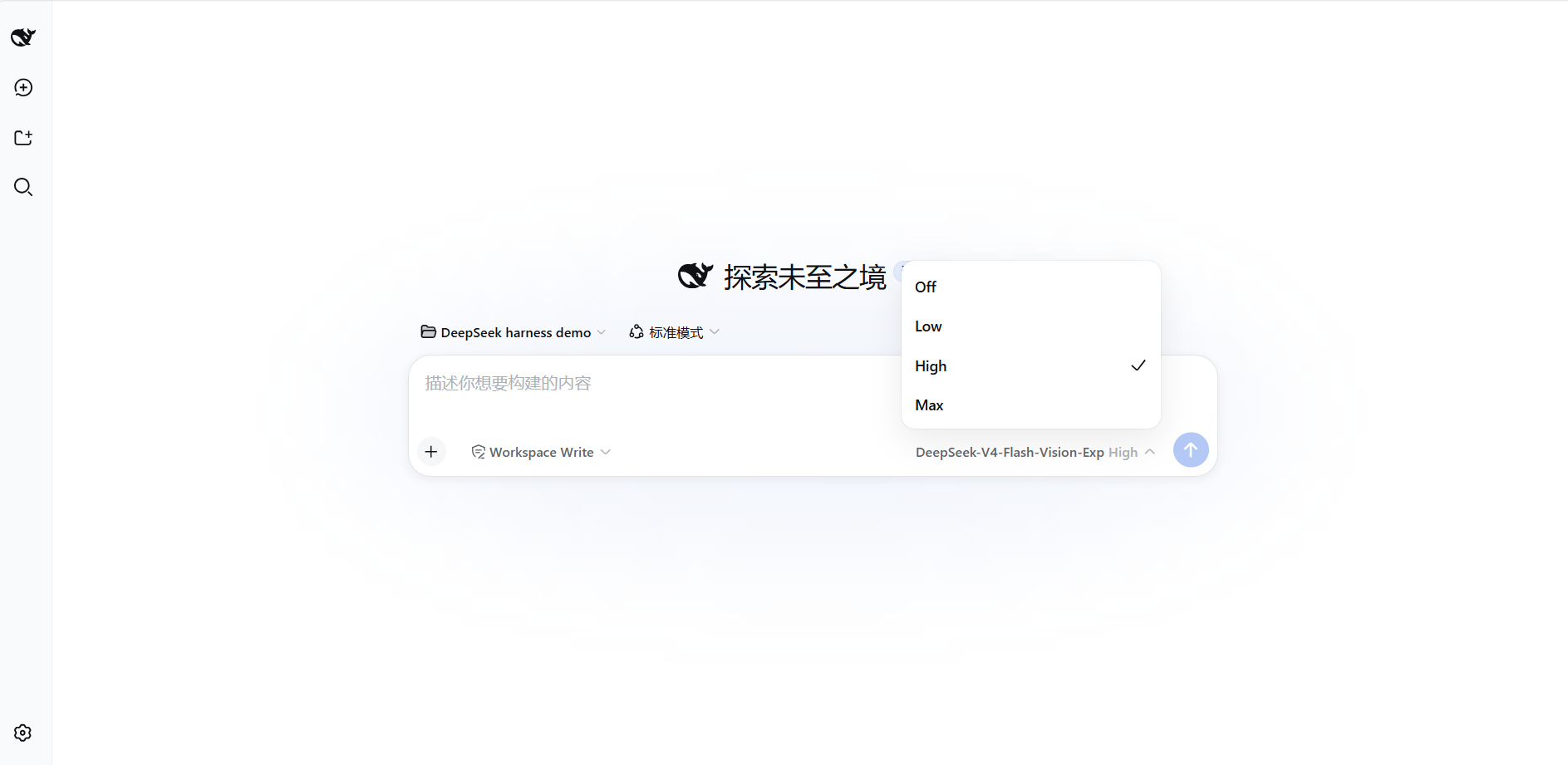
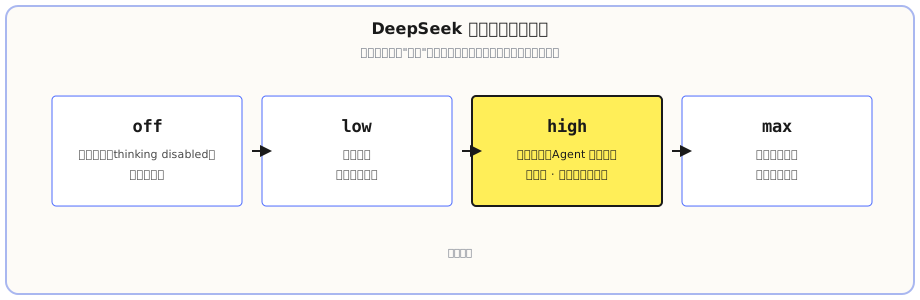
Reasoning effort decides how much the model "thinks" before acting. The official DeepSeek model has four levels. In the Web UI, click the model button on the right of the input box to see and switch between these four levels (local test, High is the default checked):
| Level | Behavior |
|---|---|
off | Disables thinking (thinking: disabled), fastest and cheapest |
low | Light thinking |
high (default) | Deep reasoning, suited for Agent tasks |
max | Highest thinking intensity, only for the hardest work |
The official default is high. The level directly affects time and cost: a thinking-enabled level is slightly slower and pricier, but more reliable on complex tasks; off doesn't think, so simple Q&A comes back instantly. Picking a level is one principle — the harder the task, the higher the level.
How to Change: Web UI or Edit the File
Both ways end up in settings.yaml:
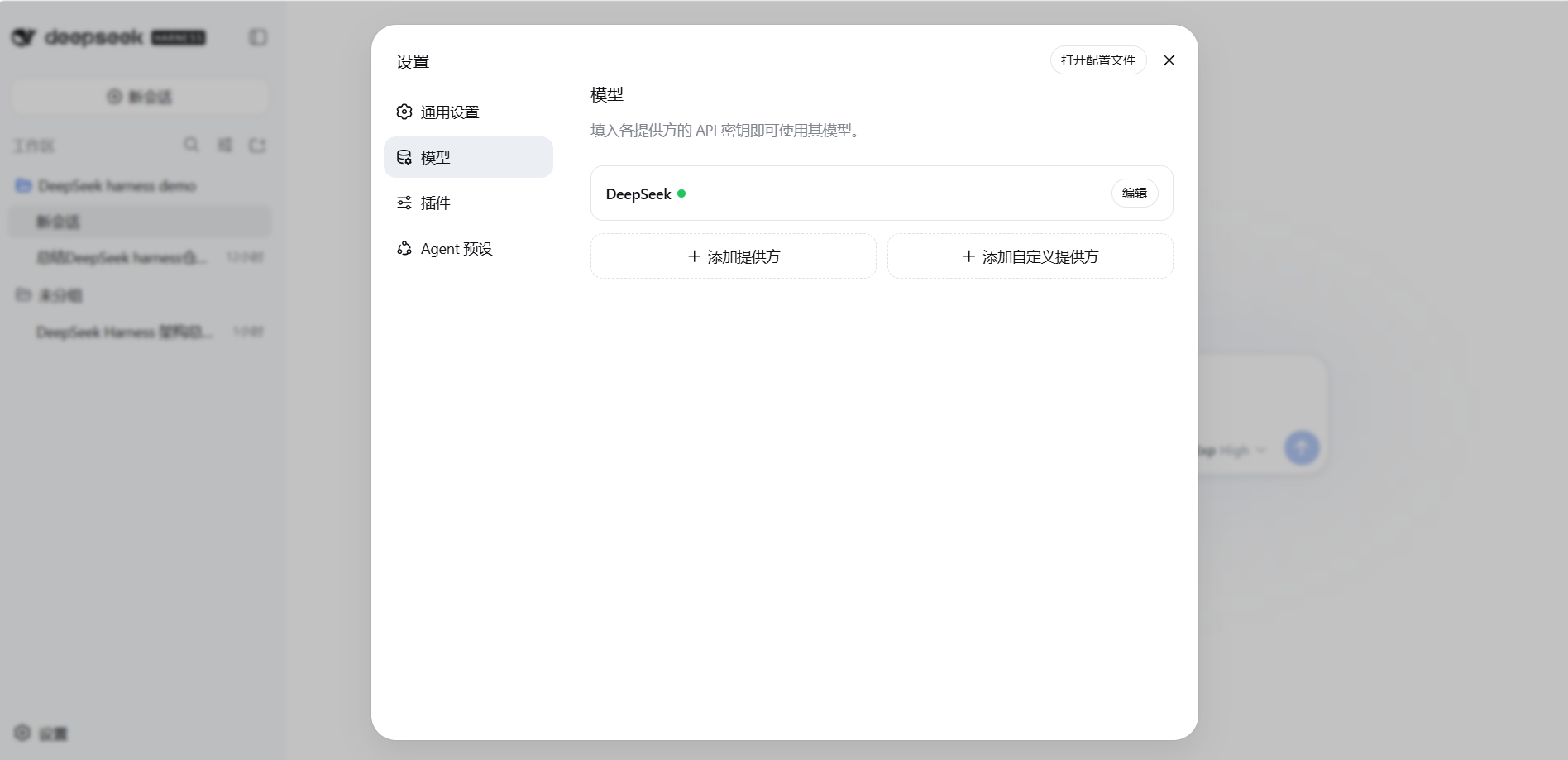
- Web UI:
Settings → Models. Store keys, see configured models, add providers. The model picked in the model selector becomes the default for new sessions; sessions that have already sent requests will keep the model they were using when they started, and won't change with the default.
- Edit the file directly: change the three fields in
agent-default-model, or add anllm-deepseek:section to override more fields (used later when wiring up a custom provider).
Effective rule: changes take effect on the next request, no service restart needed.
Configure Third-Party Models
What we just covered is the official DeepSeek setup. This is exactly where dsh shows a distinctive feature: plug in any model, not locked to its own. The official adapter just defaults to DeepSeek; you can completely plug in Anthropic, OpenAI, any OpenAI-compatible gateway, even local models. By contrast, products like Codex are limited to a fixed model set; to switch providers you have to wait for the official team to open up. In dsh, there are two ways to plug in a third party.
Method One: Add a Provider (Use Existing Directory)
The Settings → Models page has an Add Provider entry, where you find a batch of official "directories" — pick Anthropic, OpenAI, or another existing directory; the endpoint and protocol are already configured. After adding, follow the three-step form:
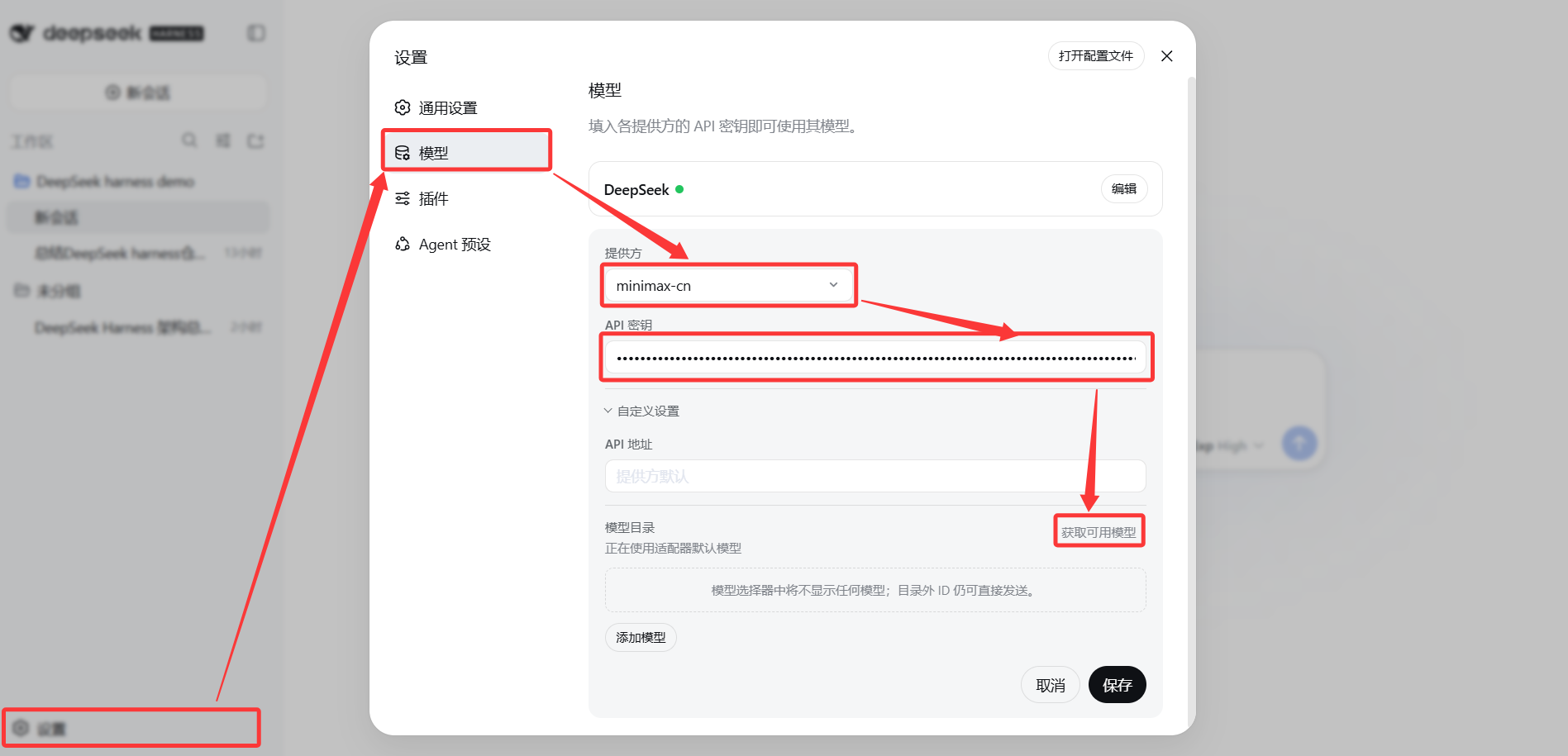
- Pick the provider: click the "Provider" dropdown and pick the provider you want to plug in (e.g. minimax-cn).
- Fill in the API key: paste the Key from that platform into the "API Key" box — masked display, write-only.
- Fetch available models: click "Fetch available models" to pull down its model directory, then you can pick its model ID from the list.
After saving, the provider's models appear in the model selector for normal use.
Method Two: Add a Custom Provider (Your Own Gateway / Local Model)
If dsh doesn't pre-install the platform you use, use Add Custom Provider. The things to fill in are exactly the three from the start of this chapter plus one more:
| Field | What it is | Example |
|---|---|---|
| Provider ID | A unique ID for this provider (lowercase, permanent once set) | my-gateway |
| API address | The Base URL, the model service's address | https://your-gateway-address |
| API protocol | What format to talk in (OpenAI / Anthropic compatible, etc.) | openai-completions |
| Key | The API Key, the auth credential | sk-... |
| Model | Fill in at least one Model ID | deepseek-v4-flash |
After saving, this custom provider appears in the model list for normal use. A few notes:
- Provider ID is permanent once set, don't change it casually; later configs reference it.
- For local models / self-built gateways, point the API address at your own service and fill the local service's key in the key field (or leave a placeholder per its requirements).
- If your custom model is a vision model (receives images), filling the Model ID alone is not enough — the official requirement is to additionally declare it supports image input. In settings.yaml, add a line
input: [text, image]to that provider, otherwise images will be rejected as invalid input.
Keys and Credentials
Behind the Key card you filled in (CH 03) there are two mechanisms:
- The key is write-only: after saving in
Settings → Models, the page only shows a redacted descriptor, the plaintext only lands inC:\Users\<your-username>\.dsh\.credentials.yaml, and settings.yaml only stores a credential reference, never plaintext. - Resolution order: at request time, the credential store is checked first, then the environment variable (default
DEEPSEEK_API_KEY) is used as a fallback. If neither has it, you getMISSING_CREDENTIAL.
Troubleshooting Cheatsheet
There are only a handful of config-related errors; find your match:
| Error | Meaning | Resolution |
|---|---|---|
MISSING_CREDENTIAL | No key configured | Go to the Models page to store a key, or set up the environment variable it references |
INVALID_CREDENTIAL | Key format is wrong | Check the Key you filled in |
UNKNOWN_MODEL | Model doesn't exist or isn't configured | Pick a configured model |
UNSUPPORTED_REASONING_EFFORT | Reasoning effort not supported | Use one of off / low / high / max |
| Fetch available models returns 401 | Key is wrong | Check the key; model discovery calls the OpenAI-compatible GET /models endpoint |
What you learned in this chapter
You pass if you can complete the items below:
- [ ] Explain the three concepts API Key / Base URL / Model ID, and where to get them (using DeepSeek as an example)
- [ ] State the location of settings.yaml and what the three fields in
agent-default-modelmean - [ ] State the positioning of each of the three DeepSeek Model IDs
- [ ] State the four reasoning effort values (off / low / high / max) and the default, and the principle for picking one
- [ ] Know that after changing the model/effort, it takes effect on the next request, no restart needed
- [ ] Know the two ways to plug in third-party models: add a Provider (existing directory, fill its key, use its Model ID) vs add a Custom Provider (Provider ID / API address / protocol / key / model)
- [ ] Know where keys are stored and why settings doesn't store plaintext
- [ ] Use the troubleshooting table to locate errors like
MISSING_CREDENTIALandUNKNOWN_MODEL