
CH 19 · Your First Plugin: hello-plugin
Chapter Goal
In CH 18 you've learned to install plugins made by others. This chapter starts writing your own — the goal is the minimum: write a hello-plugin and actually have it loaded by dsh. You don't write tools, you don't touch the interface, you only verify one thing: the plugin you write can be discovered, loaded, and run by dsh. Once this step is connected, the cool stuff in CH 20 to CH 24 (tools, hooks, UI, publishing) all grow on top of it.
First, a mindset: plugins are not mysterious. CH 09 said "everything is a plugin", the reverse is: if you want dsh to have one more capability, write a small module that exports an apply function. That's the entire skeleton of a plugin.
Hands-on: Write a hello-plugin
In the workspace you want, create the directory (first cd to that directory, then run):
New-Item -ItemType Directory -Path "hello-plugin\src" -ForceThen create hello-plugin\src\hello-plugin.js, write:
export const name = 'hello-plugin'

export function apply(ctx) {
  console.log('[hello-plugin] plugin loaded!')
}
Just these two lines of core logic: when the plugin is loaded, print [hello-plugin] plugin loaded!. If it can print, that proves "your code was run by dsh" — that's the first milestone.
Here we use JS rather than the official TS example: the globally installed dsh doesn't have a built-in tsx runtime, and directly loading
.tswill error; using.jsneeds no build, zero dependencies, runs in five minutes. When we write more complex plugins, we'll bring in TypeScript and the build chain (CH 21 expands on that).
Load It into dsh
Just having the file, dsh doesn't know to load it. We need an "overlay" to tell dsh: additionally load this plugin. Create hello-plugin\cordis.yml (the path in name below is an example, replace with your own directory, see notes after):
- insert:
    - id: hello
      name: 'file:///E:/software-workspace/DeepSeek%20harness%20demo/hello-plugin/src/hello-plugin.js'
Three notes:
namemust be a full URL starting withfile://, you cannot writeE:\...orE:/.... On Windows, dsh's module loader only accepts thefile:///E:/...form; writing the drive letter path directly will reportOnly URLs with a scheme in: file, data, and node are supported.- Spaces in the path must be encoded as
%20. For example, if your directory ismy work space, write it asmy%20work%20space. - This is an absolute path. The patch file only contributes configuration, the module resolution root is still the profile directory, so local plugins must be written as full paths.
Run headless Once for Quick Verification
Don't touch the Web UI, use headless to quickly verify the plugin is actually loaded:
cd your-workspace-directory
dsh --profile headless --patch "./hello-plugin/cordis.yml" "Just reply: hi"
In the output you'll see these two lines:
[hello-plugin] plugin loaded!
hi
The first line is printed by your plugin at startup, the second is the model's reply after completing the task. See [hello-plugin] plugin loaded!, your first plugin is up and running.
Then Load It into the Web UI
Headless can verify, but the plugin is meant to be used in the Web UI. First stop the running dsh web (otherwise the port is occupied), then start with the patch:
dsh web --patch "./hello-plugin/cordis.yml"Open http://127.0.0.1:3080, the terminal where dsh was started will also print [hello-plugin] plugin loaded!. hello-plugin has no UI effect for now, its only "output" is that log line — but this proves it has entered the web plugin tree, sitting alongside the members of the tree CH 09 talked about.
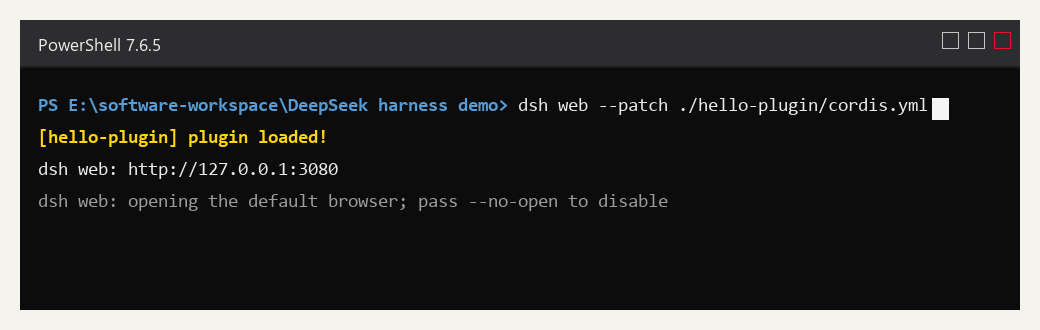
Look at the terminal output: the first line is the plugin load log printed at dsh startup, the next two lines are the Web UI's ready information.
Auto Cleanup on Unload
Everything you register with ctx (event listeners, tools, timers) will be automatically cleaned up by the framework when the plugin is unloaded; you don't need to manually removeListener or clearInterval. If you do have resources that need manual release (e.g. a network connection), use ctx.effect() to tell the framework how to clean up:
export function apply(ctx) {
  ctx.effect(() => {
    const timer = setInterval(() => {
      console.log('heartbeat')
    }, 5000)

    // The returned function runs when the plugin is unloaded
    return () => clearInterval(timer)
  })
}
The cleanup function returned by effect will be called at the moment the plugin is unloaded — this is the standard way dsh helps you manage resource lifecycle.
Declare Dependencies: inject
If your plugin needs other capabilities (e.g. tools, llm), declare inject, and the framework will ensure the dependencies are ready before loading your plugin:
export const name = 'my-tool-plugin'
export const inject = ['tools']

export function apply(ctx) {
  // Here ctx.tools is guaranteed to be available
  ctx.tools.register(/* ... */)
}
inject is the entry point for "service dependencies" in Cordis. We'll get familiar with it for now, and use it officially in CH 21 when writing tool plugins.
Three Plugin Forms
The apply function is the most common form, but plugins support three ways of writing (CH 20 will detail each, here's the overview):
| Form | What it looks like | When to use |
|---|---|---|
| Function | export function apply(ctx) {} | Default choice, what this tutorial uses |
| Object | export default { name, apply(ctx) {} } | When you want to carry some static metadata along |
| Class | export default class extends Service {} | When you want to provide services to other plugins (CH 20 expands) |
For now, just remember one line: function form solves 90% of needs, leave the service form for when "your plugin needs to be depended on by other plugins".
Let dsh Do It: One Prompt Does It
The above steps you walked through manually, all learned. But dsh itself is an Agent — it can do the job of writing plugins, and "it writes and verifies itself".
Send this prompt directly in the Web UI's input box:
In my current workspace, help me write a minimum hello-plugin plugin that dsh can load. First go read the official dsh plugin development docs, figure out how plugins should be written and loaded, then implement per the official spec, verify it's actually loaded, and finally tell me the result and where the files are.You don't need to tell it any technical details — it will go read the official plugin dev docs itself, decide how to write, how to load, how to verify. You just watch it work, then open the file to check what it wrote. This is exactly the extension of "everything is a plugin": the job of writing plugins can also be done by an Agent assembled from plugins.
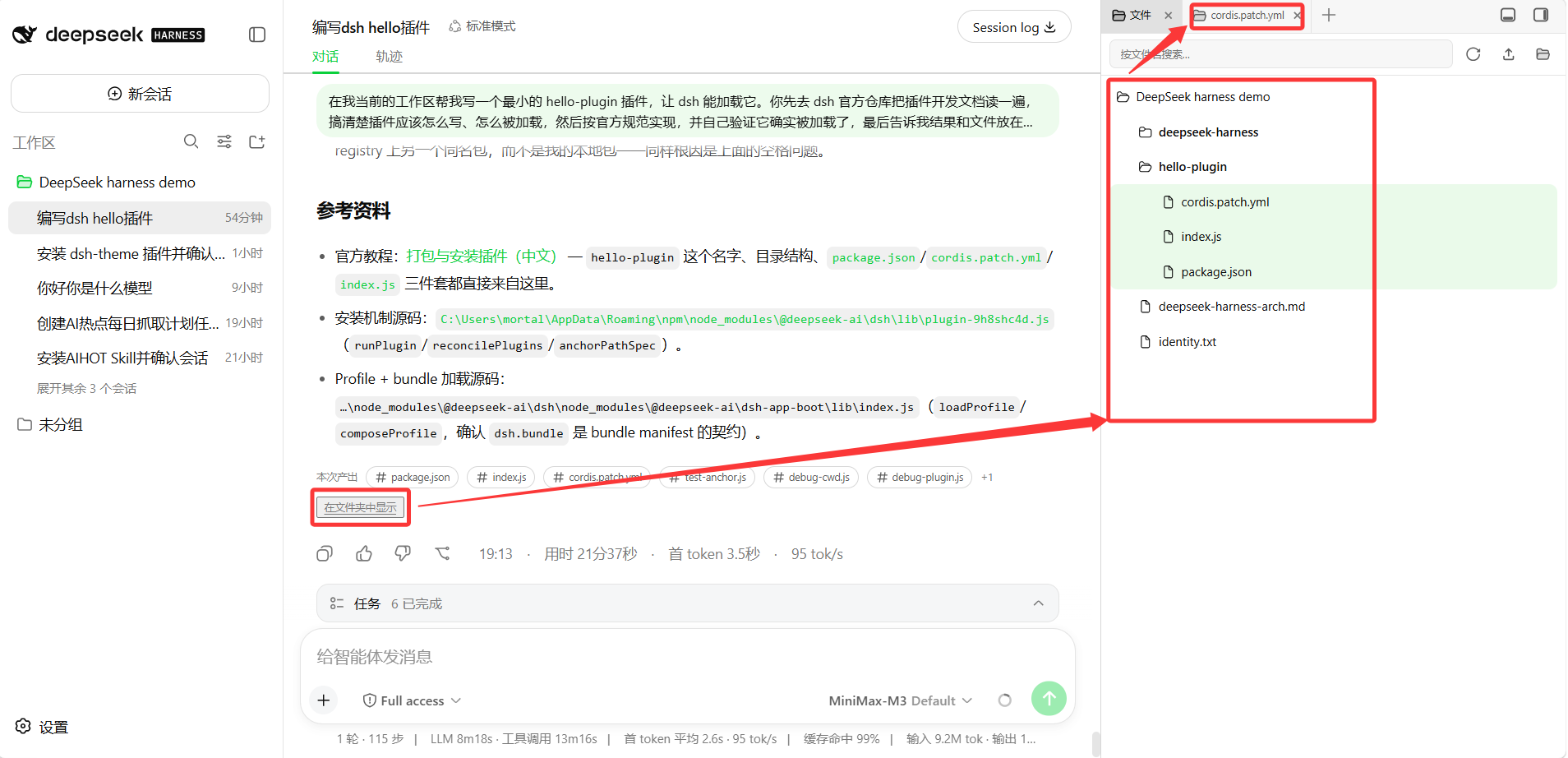
I actually ran it once, the top right shows the reference materials it listed and the files produced (package.json, index.js, cordis.patch.yml). After it finished writing, the right-side file panel directly shows the new hello-plugin directory in the workspace — exactly where the sidebar plugin installed in CH 18 shines, no need to switch to the file manager to check what it wrote.
Common Pitfalls
| Problem | What's happening | How to handle |
|---|---|---|
Reports Only URLs with a scheme in: file... | On Windows the path is written as a drive letter form | Change name to a full URL like file:///E:/... |
| Reports file/module not found | Spaces in the path aren't encoded | Write spaces as %20 |
| No response after patch and restart? | Plugin path or yml is misspelled | Check the spellings of id and name, use dsh --profile web --patch ./hello-plugin/cordis.yml --dump-config to see if the plugin is in the config tree |
Loading .ts directly errors? | Global dsh has no built-in tsx runtime | First use .js to run without building, when TS is needed build to .js first then load |
| Port occupied, can't start? | Previous dsh web is still running | Stop the old process first, then start |
What you learned in this chapter
You pass if you can complete the items below:
- [ ] State the minimum form of a plugin: a module that exports an
apply(ctx)function - [ ] Create a hello-plugin and declare it with a
file://URL incordis.yml - [ ] Use
dsh --profile headless --patch ...to quickly verify the plugin is loaded - [ ] Start web with
--patchto bring the plugin into the Web UI's plugin tree - [ ] Know that
ctx.effect()does resource cleanup,injectdeclares service dependencies, plugins have three forms: function / object / class