
CH 21 · defineTool: Craft a Tool for the Agent
Chapter Goal
In CH 19 and 19, the plugins we wrote only logged — that was just to verify "the plugin is loaded". This chapter writes the truly valuable thing in plugins: tools.
Tools are the Agent's "hands": the model says something, the code you write is called, does real work, and sends the result back to the model. In the previous chapters you've been using dsh's built-in tools (read files, run commands, search); this chapter we craft one ourselves, let the model actually reach in and call it.
Tools Are the Soul of Plugins
Recall what you use every day: dsh's Agent can read files, write files, run commands — that's tools (capabilities registered in ctx.tools). The model itself can only "talk"; tools let it "act".
The minimum skeleton of a tool plugin:
import { defineTool } from '@deepseek-ai/dsh-tools'

export const name = 'greet-tool'
export const inject = ['tools']

export function apply(ctx) {
  ctx.tools.register(defineTool({
    // The four parts of a tool, broken down one by one below
  }))
}
inject: ['tools'] declares "I want to use the tool registry", learned in CH 20; ctx.tools.register(...) mounts a tool into the registry.
The Four-Piece of defineTool
defineTool takes an object that tells dsh "what's this tool called, when should it be used, what parameters does it need, how does it do its work". A tool = a "hiring JD for the Agent":
| Field | Meaning | An analogy |
|---|---|---|
name | The tool's name, the model uses it to call | Job title |
description | Tell the model "what does this tool do, when should it be used" | Job responsibilities |
parameters | Declare which parameters are required, which are optional | Materials to submit |
execute | The function that actually does the work | Work after onboarding |
Look at a complete minimum tool (same as the official tutorial, slightly translated):
import { defineTool } from '@deepseek-ai/dsh-tools'

export const name = 'greet-tool'
export const inject = ['tools']

export function apply(ctx) {
  ctx.tools.register(defineTool({
    name: 'greet',
    description: 'Greet by name',
    parameters: {
      name: { type: 'string', required: true, description: 'Name of the person to greet' },
    },
    output: {
      schema: { type: 'string' },
      render: (_args, value) => [{ type: 'text', text: value }],
    },
    async execute(args) {
      return `Hello, ${args.name}!`
    },
  }))
}
Four key points:
parametersis written in JSON Schema:type: 'string'declares the parameter type,required: truedeclares it's required. The framework automatically validates the parameters the model passes; non-compliant ones error out — you don't need to manually type-check inexecute.execute(args)is the function that actually does the work:argshas been validated, just use it confidently. It returns a "canonical value" (a string here).output.schemadeclares the shape of the return value,output.renderconverts the return value to content the model can see (a text block here). The return value first exists in canonical form, the rendering layer is responsible for "translating" it to the model.descriptionis extremely important: the model uses it to judge "should I use this tool right now". Write it clearly, write it specifically, and the model will know when to call it.
Hands-on: Write a greet Tool, Make the Model Actually Call It
In a workspace where you want to put plugins, create a directory:
New-Item -ItemType Directory -Path "tool-demo\src" -ForceStep 1: Install Dependencies
defineTool comes from @deepseek-ai/dsh-tools, install it in the plugin directory first:
cd "E:\software-workspace\DeepSeek harness demo\tool-demo"   # replace with your directory
npm init -y
npm install @deepseek-ai/dsh-tools
Remember to add a line "type": "module" in package.json (CH 20 mentioned, without it there'll be a bunch of warnings).
Step 2: Write the Tool
Create tool-demo\src\greet.js, with the same greet tool as above. I added a log line in execute to easily confirm in the terminal that it was really called:
import { defineTool } from '@deepseek-ai/dsh-tools'

export const name = 'greet-tool'
export const inject = ['tools']

export function apply(ctx) {
  ctx.tools.register(defineTool({
    name: 'greet',
    description: 'Greet by name',
    parameters: {
      name: { type: 'string', required: true, description: 'Name of the person to greet' },
    },
    output: {
      schema: { type: 'string' },
      render: (_args, value) => [{ type: 'text', text: value }],
    },
    async execute(args) {
      console.log('[greet] called with', args.name)
      return `Hello, ${args.name}!`
    },
  }))
}
Step 3: Declare and Verify
Create tool-demo\cordis.yml (replace the path with your own, remember %20 for spaces):
- insert:
    - id: greet
      name: 'file:///E:/your-workspace/tool-demo/src/greet.js'
Use headless to run once, let the model actually call it:
cd your-workspace-directory
dsh --profile headless --patch "./tool-demo/cordis.yml" "You must call the greet tool, say hi to Ada, then tell me verbatim what the tool returned"
In the terminal output you'll see:
[greet] called with AdaThis is the evidence that execute was actually called by the model — your code was really executed by the model reaching in. And the model's reply will contain the tool's returned Hello, Ada!.
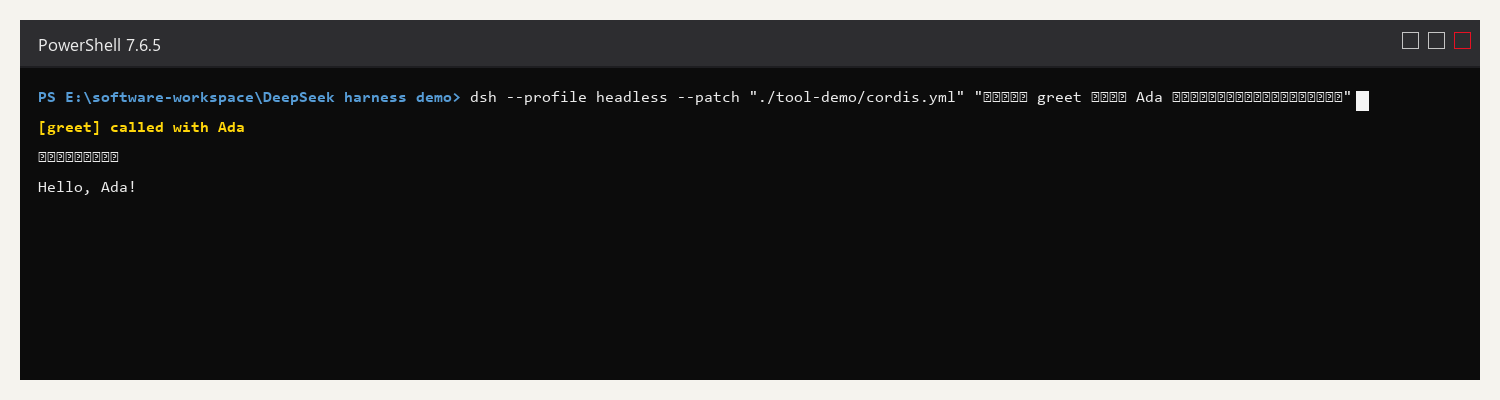
The yellow [greet] called with Ada in the terminal is the log of execute being actually called by the model; the Hello, Ada! below is the result the tool returns to the model.
Let dsh Do It: One Prompt Does It
The tool-writing flow is exactly the same as writing a plugin, dsh can do it itself, and it knows defineTool's fields and how the schema should be written better than you.
Send this prompt directly in the Web UI's input box:
In my current workspace, help me write a tool plugin: use defineTool to define the simplest tool (with one required parameter, returning some text in execute). First read the dsh official docs to understand defineTool's fields and parameter validation rules, implement per the official spec, then run a headless to have the model actually call it, and finally tell me the result and where the files are.It will go look up the docs itself, install dependencies, write the tool, verify the model actually called it. You just verify.
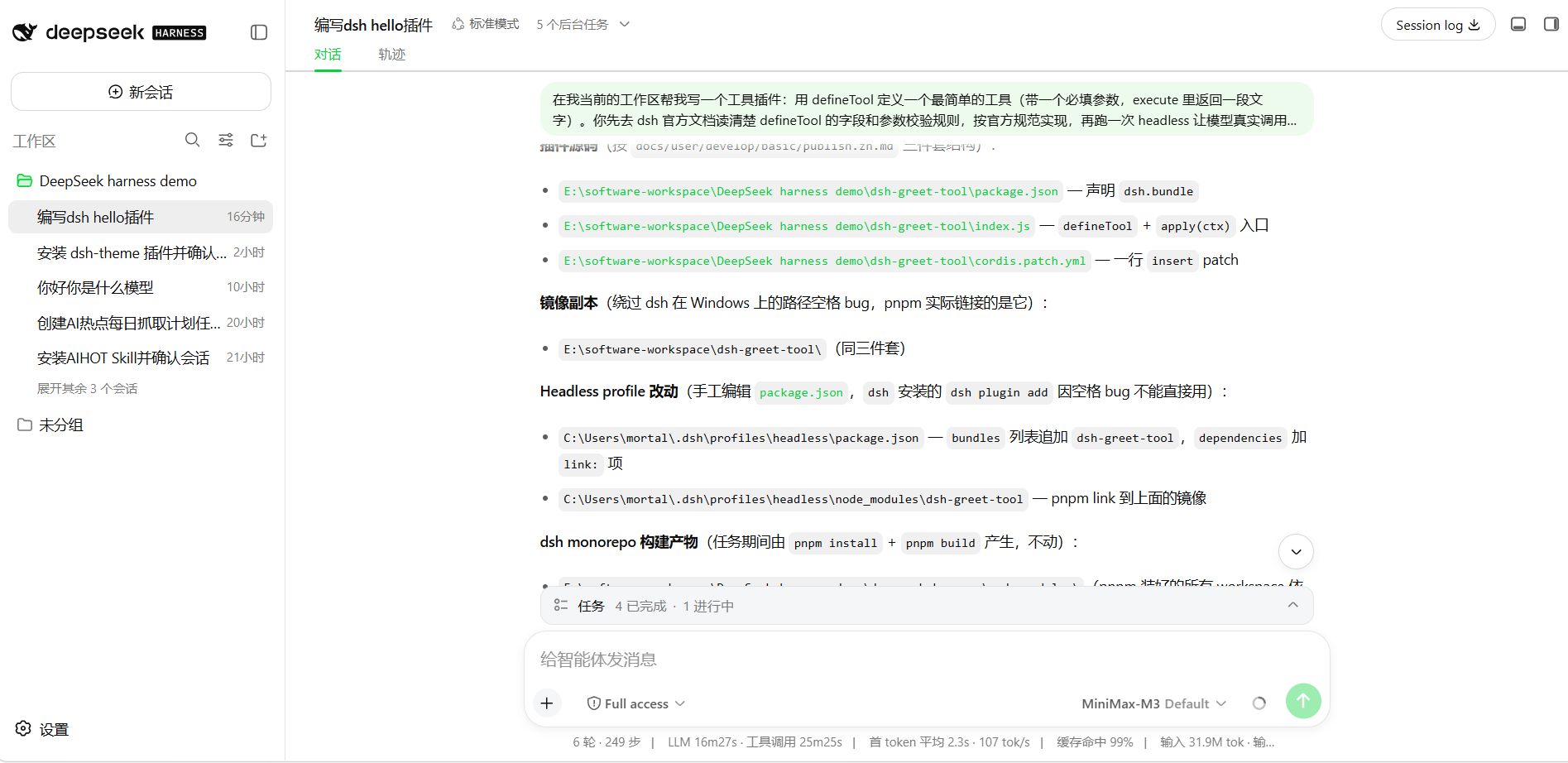
This is the result of me actually running this prompt: it read the docs itself, built the three pieces of the plugin (package.json declaring bundle, defineTool entry index.js, a one-line insert cordis.patch.yml), and even discovered that Windows paths with spaces would break the install command parsing, and proactively moved the plugin to a no-spaces path before installing — it hit the pitfall, and worked around it itself.
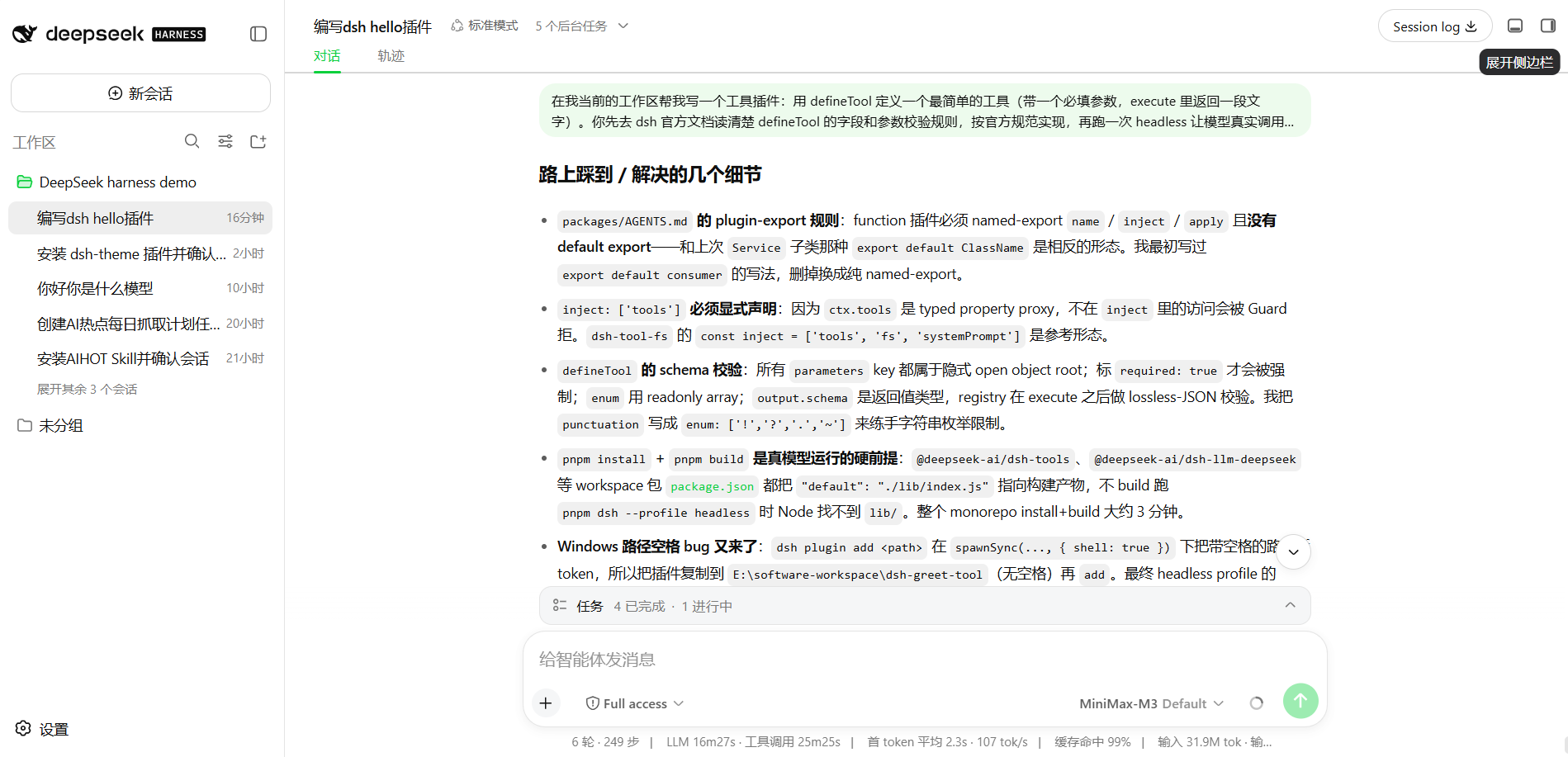
After running, it also organized the pitfalls into a list: plugin export form requirements, inject must be explicitly declared, workspace packages need build artifacts to run, path-spaces pitfall.
Common Pitfalls
| Problem | What's happening | How to handle |
|---|---|---|
Reports Cannot find package '@deepseek-ai/dsh-tools' | Plugin directory didn't install dependencies | npm install @deepseek-ai/dsh-tools |
| Model never calls your tool | description is unclear, model doesn't know when to use it | Make description specific: "Use when user requests X" |
| Parameters not passed correctly | schema and model understanding don't match | Write clear description for each parameter in parameters |
| Tool reported a parameter error | Model passed illegal parameters | Mark required items with required: true, write the type correctly |
| Model called it but result is wrong | Logic in execute is wrong | Add console.log in execute to debug, check the logs |
What you learned in this chapter
You pass if you can complete the items below:
- [ ] State the defineTool four-piece:
name/description/parameters/execute - [ ] Know that
parametersis JSON Schema, the framework automatically validates parameters - [ ] Write a tool plugin and register it to
ctx.tools - [ ] Use headless to verify the model actually called your tool
- [ ] Know that
descriptiondecides when the model uses your tool