
CH 13 · Plug into the MCP Ecosystem
Chapter Goal
dsh's built-in tools (read files, run commands, search the web) are enough for daily use, but the outside world is full of scattered tools — GitHub, databases, memory, browsers, various SaaS — they don't run into your Agent on their own. This chapter plugs the MCP ecosystem in: first explain what MCP is, why dsh uses a "plugin" to connect, then hands-on mount the Firecrawl MCP server, so the model can call its tools as if they were native tools.
First Understand: What Is MCP
MCP (Model Context Protocol) is an open protocol that solves the general problem of "how AI applications connect to external tool servers". You can think of MCP as the USB-C of the tool world: a standard interface, and you can plug any device into it.
The MCP ecosystem already has a large batch of ready-made MCP servers:
| MCP server | What it does |
|---|---|
| File system | Read/write subdirectories (expose a local directory to the Agent) |
| GitHub | Create issues, raise PRs, query repos |
| Database | Query various databases |
| Memory | Long-term memory access (you'll see this again in CH 15) |
| Browser | Control the browser, scrape pages |
The way to plug MCP into dsh is right in line with its style — one plugin: @deepseek-ai/dsh-mcp-client. This official plugin's role is pure: connect every MCP server you declare, and register the tools they provide into ctx.tools (the tool registry CH 12 mentioned), so in the model's eyes they're no different from native tools. This once again confirms CH 09's "everything is a plugin" — MCP integration is no exception.
A few points to know upfront:
- Tool naming is two levels: first there's an MCP server (e.g. Firecrawl), and it has a batch of tools underneath (
firecrawl_scrapescrape page,firecrawl_searchsearch page,firecrawl_maplist site map...). After being plugged in, each tool appears asmcp__<server-name>__<tool-name>— if the server name isfirecrawl, its scrape tool ismcp__firecrawl__firecrawl_scrape. This matches the naming format of Claude Code and Codex. Different servers can share names without conflict (each has its own prefix). - No servers are enabled by default: whether the plugin is installed is one thing; which servers to connect to is completely up to your declaration. Without configuration, it connects to nothing. Once declared, the server will connect when dsh starts, and the tools register into the tool list; as for which round calls which tool, the model picks on its own per the current task — it doesn't call every tool every time.
- Currently only "tools" are bridged: besides "tools" (Tool, callable actions), the MCP protocol also has two other capabilities — "Resources" (Resource, read-only data and files) and "Prompt templates" (Prompt). dsh's bridge plugin currently only brings in "tools"; resources and prompt templates can't be used yet.
- Many servers require authentication: MCP servers that connect to real services, like GitHub and Firecrawl, usually need an API Key or token. Keys are passed via the
headersfield in the config (HTTP method), don't hardcode them in the config file — the config section below expands on this.
Hands-on: Connect Your First MCP Server — Firecrawl
Below, Firecrawl (a real web-scraping MCP service, Firecrawl website) walks you through. Its MCP server provides a batch of web tools: firecrawl_scrape (scrape a single page), firecrawl_search (search the web), firecrawl_map (list site map), firecrawl_crawl (crawl an entire site), firecrawl_extract (extract structured fields), etc.
Step 1: Confirm the MCP Client Plugin Is in Place
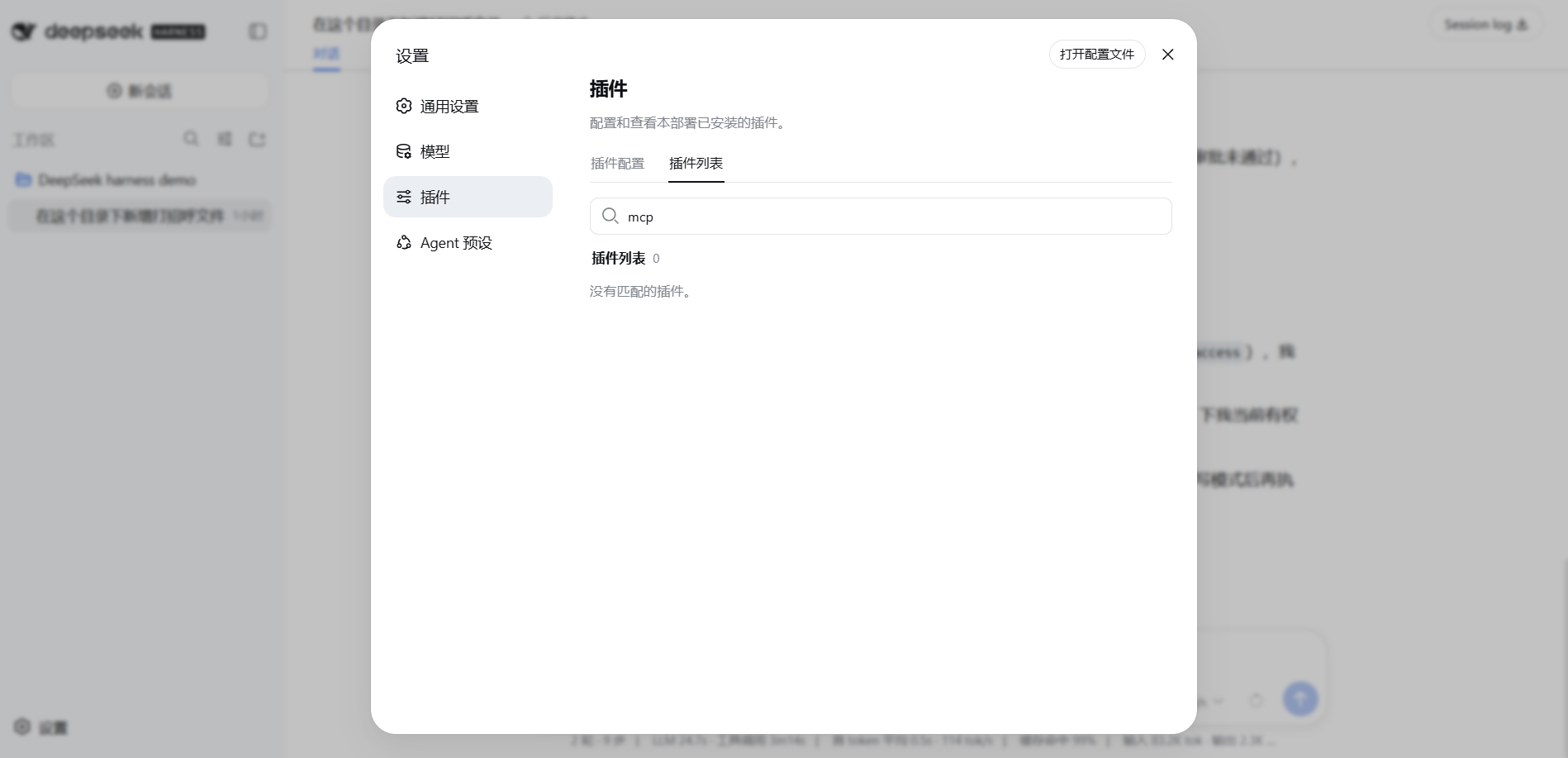
First confirm whether dsh-mcp-client is there. No need for the command line; check the plugin list directly in the Web UI: open Settings → Plugins, search for mcp. The picture below is my result — after typing mcp in the search box, the plugin list is empty ("no matching plugins"), meaning it's not installed:
If you can't find it in the list, go back to the command line and install it as a dependency of the web profile:
dsh plugin --profile web add @deepseek-ai/dsh-mcp-clientNote: this command only packages it into the profile (dsh plugin list --profile web shows the dependency), it won't start on its own — for the plugin to actually be loaded, you need to insert it in cordis.patch.yml in step 3 and configure the servers. There's a pitfall from real testing: if you only insert the plugin without server config, dsh startup will directly report Cannot read properties of undefined (reading 'serverName') because serverName is a required field.
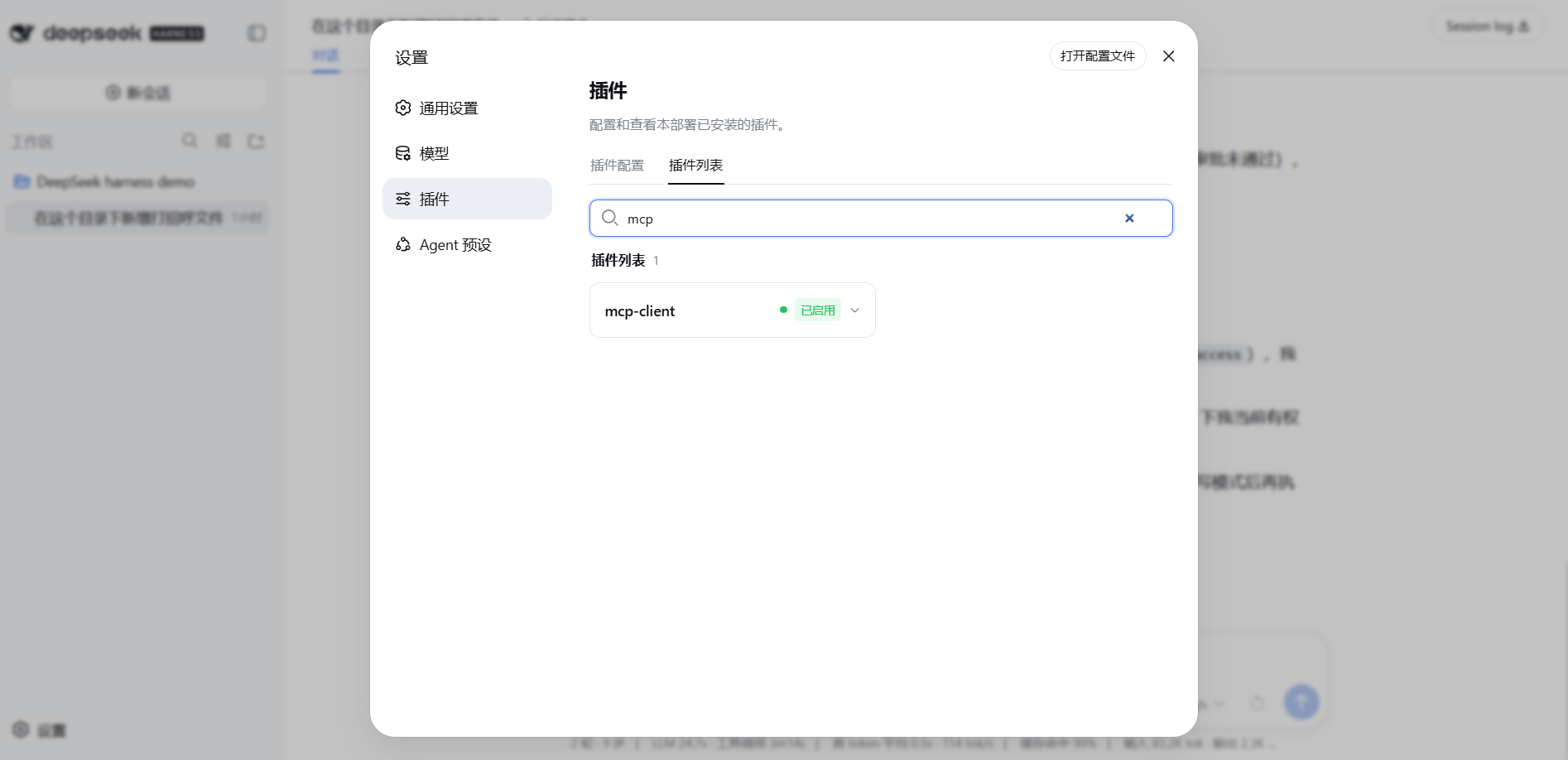
After configuration and reopening dsh, go back to Settings → Plugins and you'll see mcp-client, status "enabled" (the picture below is after installation, with the search box still showing mcp, plugin list 1 item, status enabled):
Step 2: Get a Firecrawl API Key
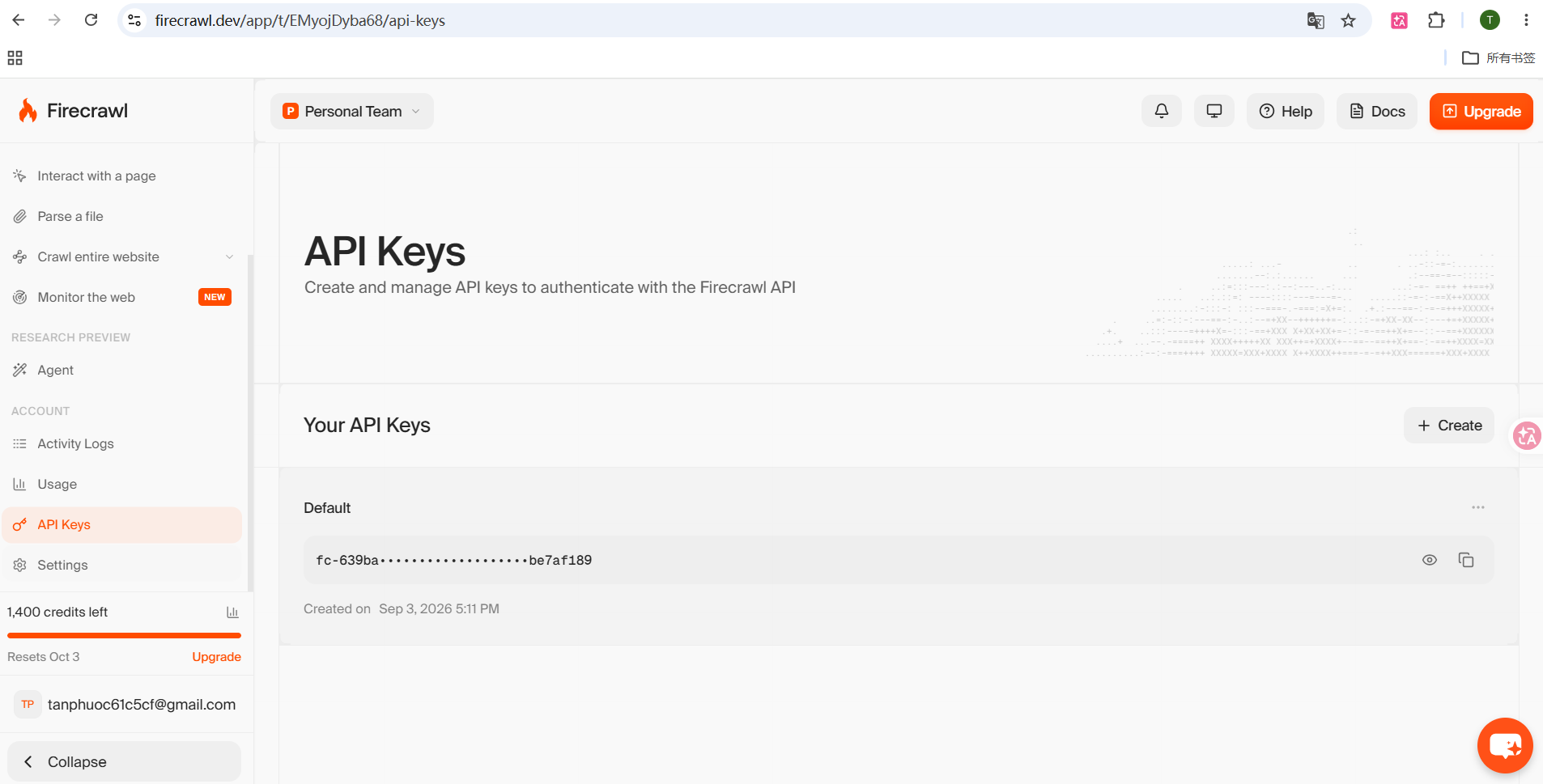
Firecrawl requires authentication. Log in to the Firecrawl website, register and create an API Key — the official usage is to send it as a Bearer token to https://mcp.firecrawl.dev/v2/mcp. The free tier has 1000 credits per month.
The picture below is the page where I created it: on the left you can see the remaining credits, in the middle is the default key listed (fc- prefix, middle redacted), top right has + Create:
After getting the key, first set it as a system environment variable (step 3 config will reference it). Let me be clear on one thing: environment variables are not written in a text file; they are a "list" maintained uniformly in the Windows system UI; the settings interface adds an entry to this list. On Windows, use the GUI; no commands needed:
- Press the
Winkey, type "environment variables", open Edit the system environment variables - Click the Environment Variables button at the bottom right
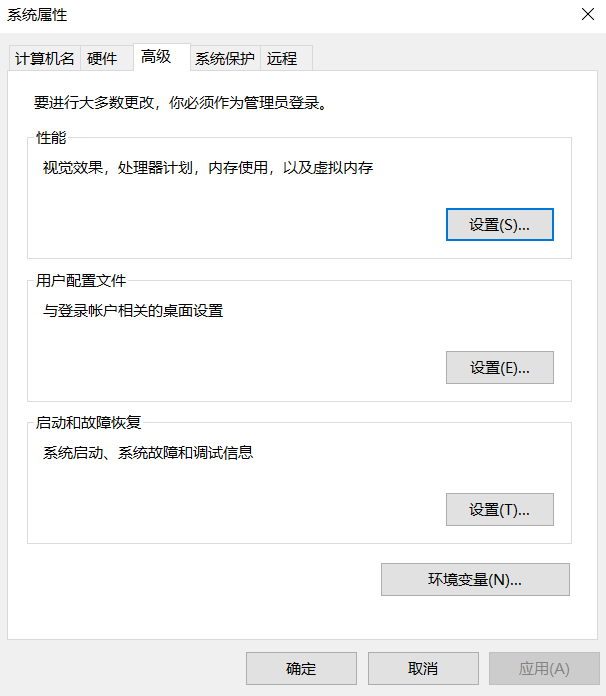
- In the User variables section click New: variable name fill
FIRECRAWL_API_KEY, variable value fillfc-your-full-key
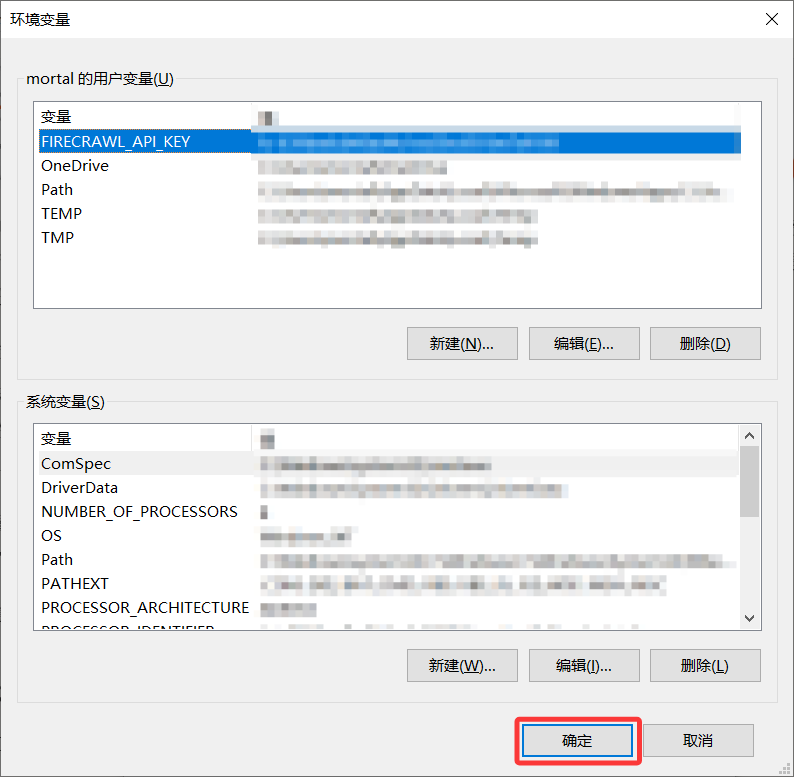
- Click OK all the way to close the windows
Note: after setting, open a new terminal to start dsh — already-open windows won't auto-read newly set environment variables.
Step 3: Declare Firecrawl in the Profile Config
The MCP server's config is written in the web profile's patch file (the cordis.patch.yml from CH 09):
- Windows:
C:\Users\<your-username>\.dsh\profiles\web\cordis.patch.yml - macOS / Linux:
~/.dsh/profiles/web/cordis.patch.yml
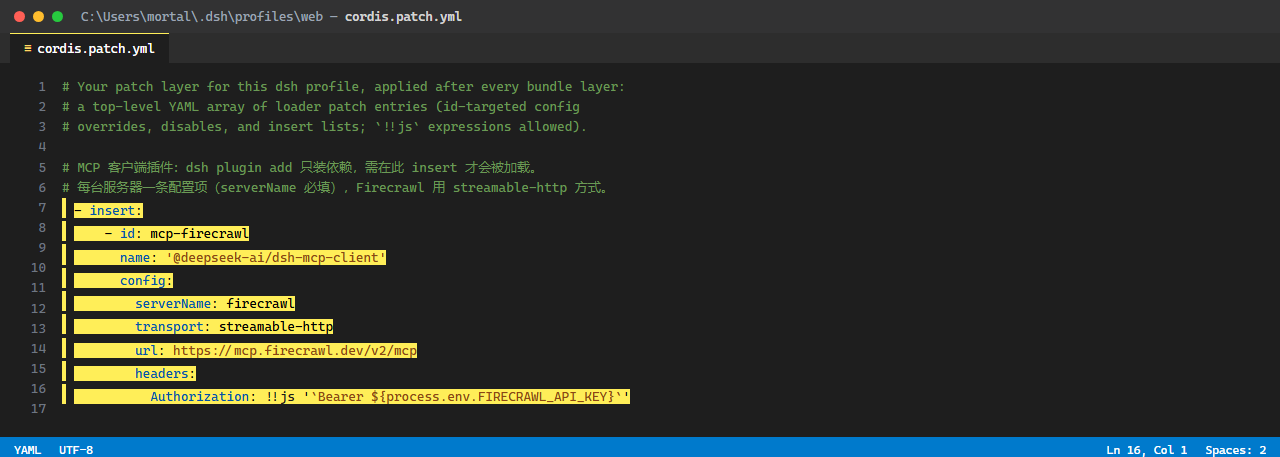
Add a server to the insert list, using the official-recommended streamable-http method (connect to a remote endpoint):
In each insert entry,
serverNameis required (the startup error in step 1 was caused by it being empty) — it's the namespace for tool names, and decides whatmcp__<here>__toollooks like.
Firecrawl's official remote endpoint is https://mcp.firecrawl.dev/v2/mcp, authenticated with a Bearer token:
- insert:
    - id: mcp-firecrawl
      name: '@deepseek-ai/dsh-mcp-client'
      config:
        serverName: firecrawl
        transport: streamable-http
        url: https://mcp.firecrawl.dev/v2/mcp
        headers:
          Authorization: !!js '`Bearer ${process.env.FIRECRAWL_API_KEY}`'
The key is referenced through the environment variable (process.env.FIRECRAWL_API_KEY), not directly hardcoded in the file (see step 2 for how to set the environment variable) — once the file is committed to Git it could leak. To plug in other MCP servers later, just add another insert entry in this format.
A few common field descriptions:
| Field | Meaning |
|---|---|
serverName | The tool-name namespace (mcp__<here>__tool), 1–32 alphanumeric underscores, unique within a scope |
transport | stdio (local program) or streamable-http (remote service) |
command / args / env | The executable, arguments, extra environment variables for stdio |
url / headers | The HTTP endpoint address and extra request headers (auth token goes here) |
toolCallTimeoutMs | Per-tool-call timeout (default 60 seconds) |
reconnect | Auto-reconnect policy on disconnect (default enabled, 500ms initial backoff doubling, 30s cap, give up after 10 consecutive failures) |
After editing and saving, the file looks like this — the newly added insert section is highlighted:
Step 4: Restart, Let the Model Call
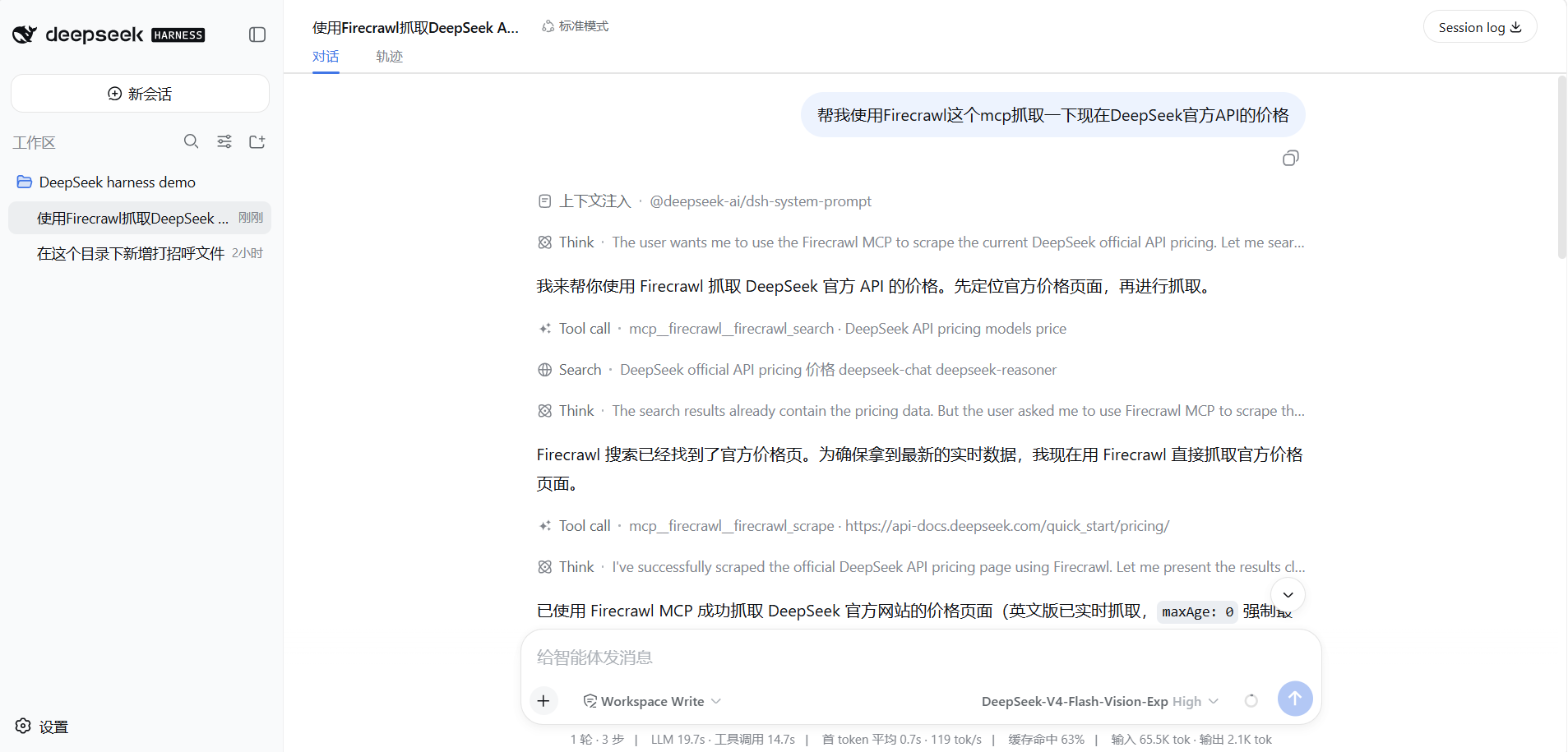
Reopen dsh, and wait for it to finish starting. Firecrawl's tools don't have a dedicated "tool list page" for you to look at; the most direct way to confirm is let the model use it once:
- In the session, send:
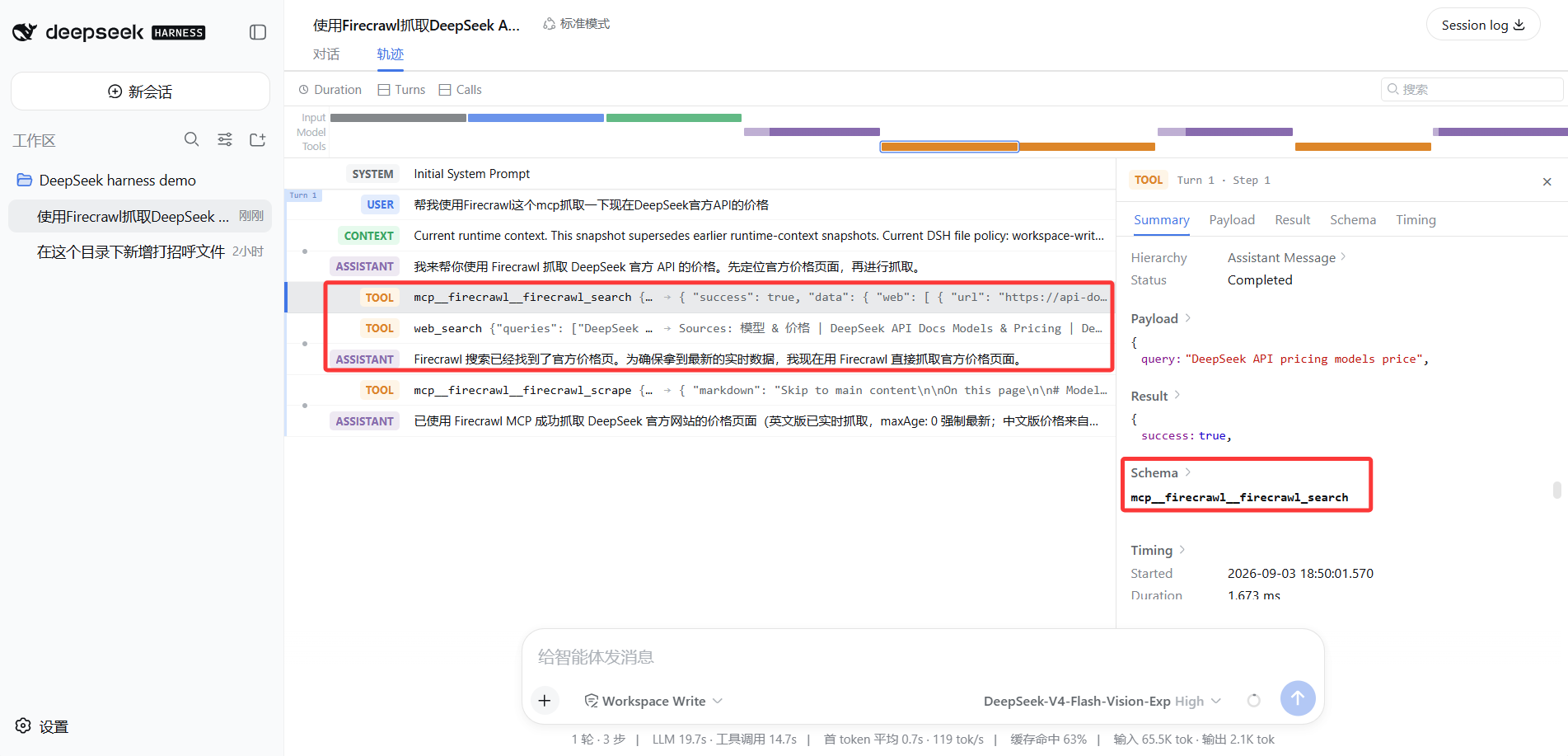
Use Firecrawl to scrape the main content of deepseek.com - Watch the model's reply and the Trajectory: if the connection is successful, the model will call
mcp__firecrawl__firecrawl_scrape, a TOOL row appears in the Trajectory, and the right-side panel shows theurlparameter and the markdown result scraped back
- If the tool doesn't come in, the model will explicitly say "I don't have this scraping tool here", or simply fall back to the built-in web search — both indicate the server is not connected; go back to the previous section to troubleshoot
Want to Save Trouble? Install Two Community Plugins
The official build has neither a "tool list" page nor a "browse plugins" entry; the community has filled in these two, both needing just one command:
① Plugin market dsh-market (987 stars): after installation, Settings has a new "Plugin Market" where you can browse by category, search, and one-click install community plugins. Most plugins installed via the market take effect just by refreshing the page, no need to restart dsh:
dsh plugin --profile web add dshmarket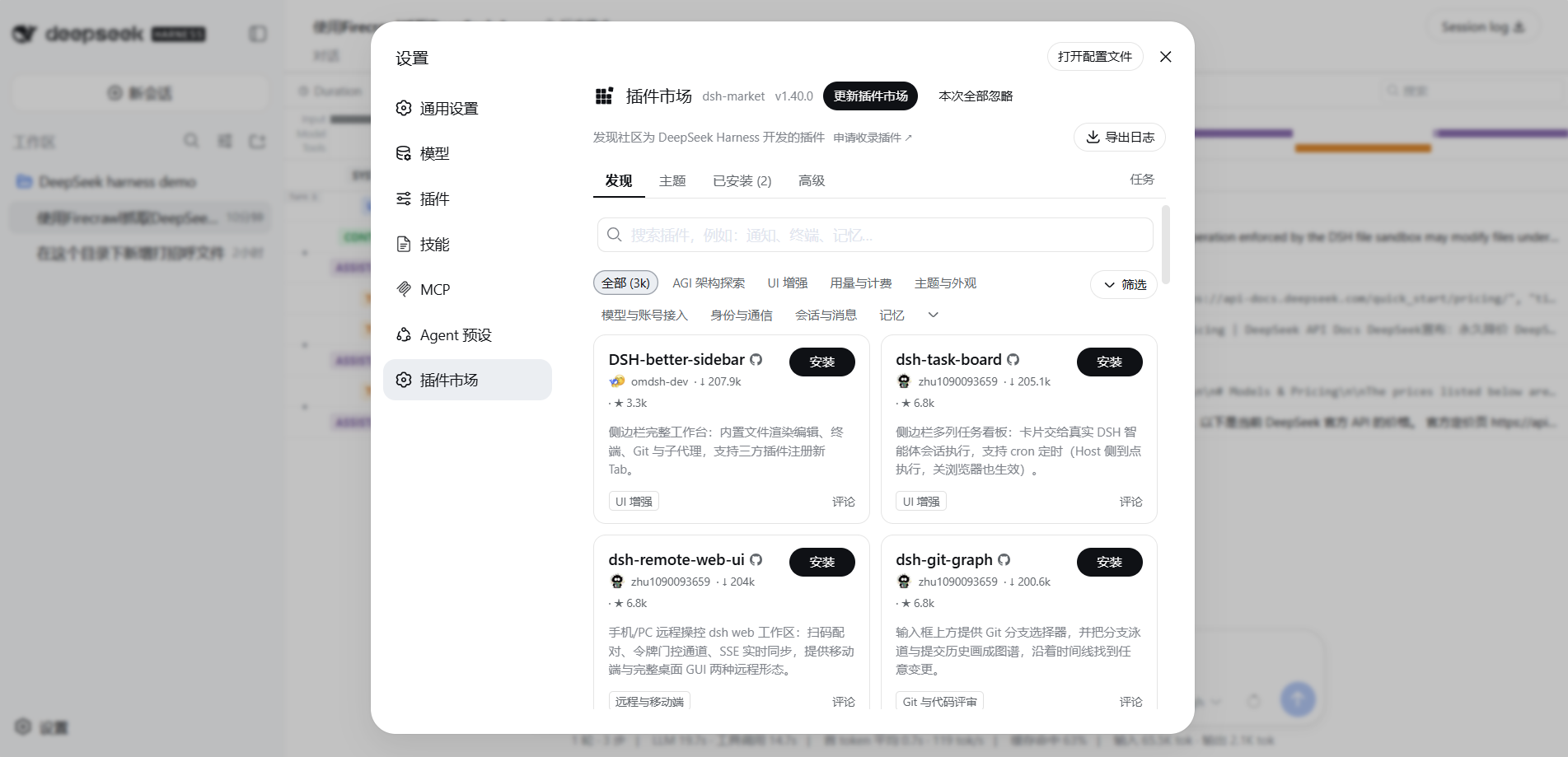
② MCP visualization panel DSH Skill & MCP Panel (108 stars): after installation, Settings has a new "MCP Management"; each server's status and tool count are directly visible, add/remove/edit, start/stop can all be done in the UI without editing cordis.patch.yml. No need to type commands — search for dsh-skill-mcp-panel directly in the market ①, one-click install, takes effect after refreshing the page (some host-level plugins will say "restart required", just follow the instructions):
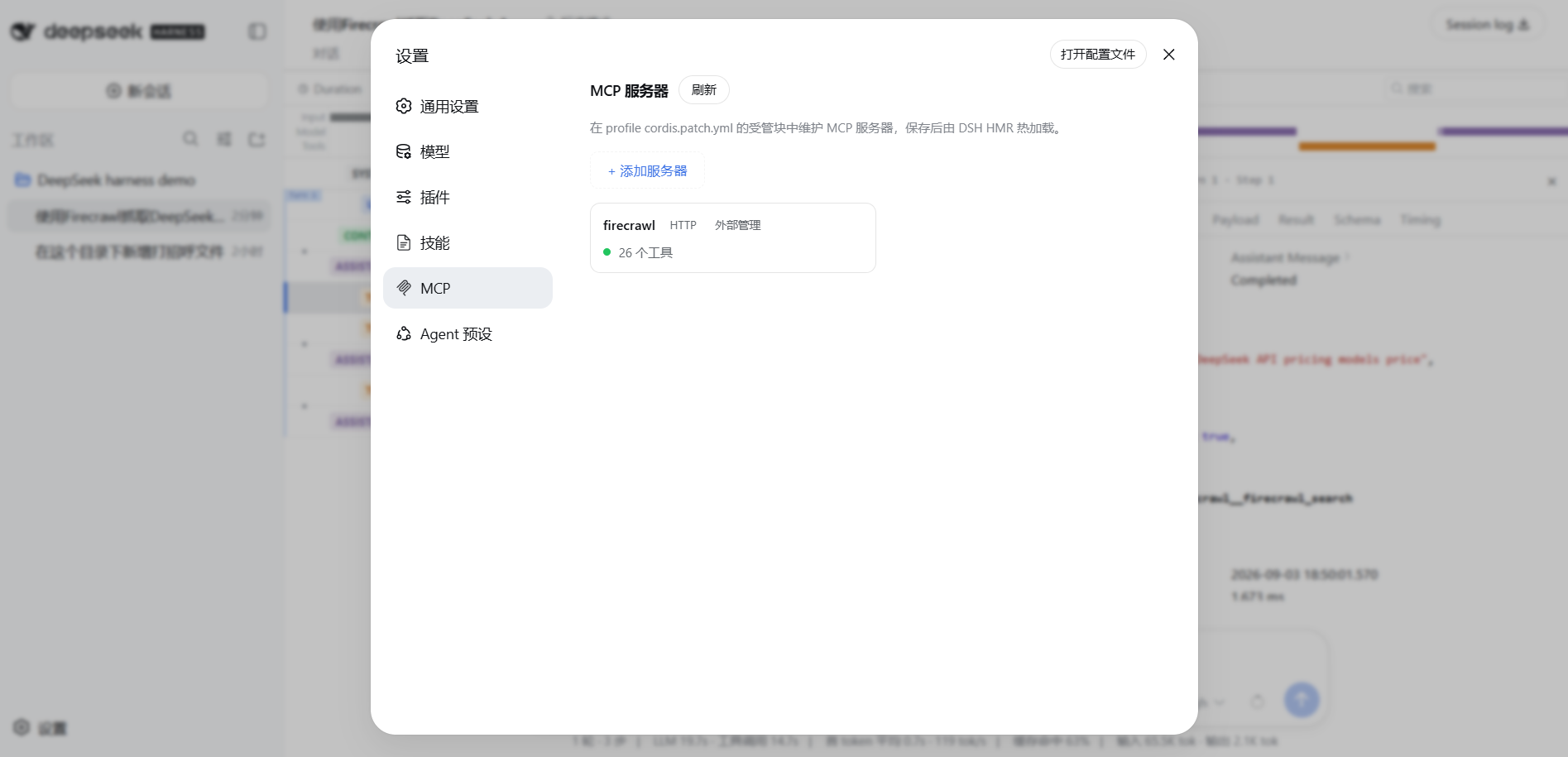
These two plugins are exactly the footnote to that line at the start of this chapter — everything is a plugin: official UI capabilities that don't exist, community plugins fill in, and once installed they become part of dsh.
There's a lot more to plugin installation and management — command-line installation, bundle auto-mounting, global vs Profile. This chapter just opens a window on it in the MCP scenario; later, a whole chapter will systematically cover plugin installation, then move on to plugin development, and connect all the way to scenario practice.
Common Questions
| Problem | How to handle |
|---|---|
| Connected but don't see the tool? | First check the logs for connection/discovery errors; confirm the server itself is reachable (use a browser or curl to test the endpoint directly); confirm serverName doesn't collide with another server; for auth-required servers, check whether the key is passed correctly (401/403 is usually this) |
| Where do keys for services like Firecrawl go? | Pass via headers in the config (HTTP method), set the key as an environment variable before starting (step 2), don't hardcode in cordis.patch.yml — once the file is committed to Git it could leak |
| What if the server crashes? | The plugin auto-reconnects (500ms initial backoff doubling), tools are still listed during reconnect but calls will fail; after 10 consecutive failures the tools are removed until config reload or restart. Editing config will reload server connections in place, unchanged names stay unchanged |
| Will it consume too many tokens? | Every server's tool description and input schema enters each request. Connect only what you actually use; don't hoard a pile |
What you learned in this chapter
You pass if you can complete the items below:
- [ ] Explain what MCP does, and how dsh plugs into it (one plugin
dsh-mcp-client) - [ ] Know that tool naming is two levels: one MCP server has multiple tools, after plugging in they appear as
mcp__server-name__tool-name - [ ] Know how keys for auth-required MCP servers (like Firecrawl) are passed, and why they aren't hardcoded in the config file
- [ ] Be able to declare an MCP server in
cordis.patch.yml(at least one of stdio or streamable-http) - [ ] Have the model actually call an MCP tool, and see the
mcp__prefixed call in the Trajectory - [ ] When the server fails to connect or crashes, know where to look for errors and how to troubleshoot
- [ ] Know that for convenience, you can install two community plugins: dsh-market (Plugin Market) and DSH Skill & MCP Panel (MCP visualization)