CH 14 · Subagents and Multi-Agent Orchestration
Chapter Goal
When a task is too big or too tangled, instead of letting one Agent grind to the end, let it split it into a few pieces, send several subagents to work in parallel, and gather the results when done. This chapter makes clear: why multi-Agent, what dsh subagents look like, then hands-on run "split task → parallel delegation → merge results", and finally put the full tool family in the inventory.
Why Multi-Agent: Three Hard Spots of Single-Threaded
An Agent going from start to end will hit three problems:
| Hard spot | Symptom |
|---|---|
| Context pollution | Halfway through the task, the early steps, intermediate results, and errors all pile up in the same session, and the model increasingly can't tell which info is most important right now |
| Cannot parallelize | Look up info, write a draft, review code — three things can only queue, the next one waits when the previous isn't done |
| Drifts further off track | On long tasks the model easily gets stuck going down a wrong path, retrying the same failed route, burning tokens |
Multi-Agent thinking is exactly the remedy: context isolation. Each subagent only holds the context relevant to its task; the main agent splits, dispatches, and collects. Token consumption is controllable, and every step can be reviewed in the Trajectory.
A Key Fact: Subagents Are Also Plugins
First, reassurance: subagents are not a separate thing dsh has hidden away; they are plugins — another confirmation of CH 09's "everything is a plugin". And subagents are already standard in current Agent tools — Claude Code, Codex both have this capability; the only difference is that dsh still exists as a plugin: take it if you want, or you can swap the whole thing out if you don't.
In the config tree, you can see a delegation contract ctx.subagents whose only job is to register "who can be a subagent". Then different provider plugins mount specific backends onto it:
| Plugin | What it runs |
|---|---|
subagent-spawn-in-process | A brand-new in-process subagent (independent context) |
subagent-fork-in-process | "Derive" a subagent from the parent session's completed history |
subagent-acp | Uses the Agent Client Protocol, accepts out-of-process ACP-compatible Agents |
subagent-codex | Runs a real Codex (official app-server protocol) |
subagent-claude-code | Runs a real Claude Code (official Agent SDK) |
subagent-dsh-sdk | Starts another full Harness via the TypeScript SDK |
What can the main agent see? They are some "model-visible tools". Open the web config tree, the default is:
| Tool | What it does | Default |
|---|---|---|
subagent | Dispatch a subagent, continuable mode | on |
subagent_fork | Dispatch a subagent with the parent session's memory, one-shot | on |
ralph | Each round swaps in a new subagent to advance the same goal | on |
workflow | Write scripts to parallel-orchestrate multiple sub-tasks | off (not enabled by default) |
send_message | Send follow-up instructions to a specified subagent | off (not enabled by default) |
interrupt_agent | Interrupt a subagent's current round | off (not enabled by default) |
list_agents | List the current subagents and their states | off (not enabled by default) |
So out of the box, you can call subagent, subagent_fork, and ralph directly. The other tools are either off by default and need to be turned on manually, or are only useful in "continuable mode" — the next section will cover where each of them appears.
spawn vs fork: Two "Openings"
The two most commonly used subagents, the difference is just one: whether to bring the parent session's history along.
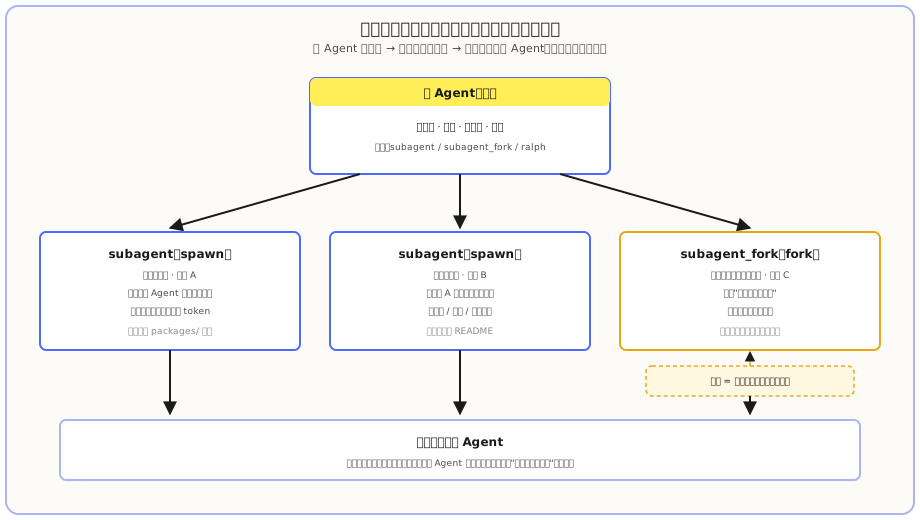
subagent(spawn): brand-new context. The subagent doesn't know what the main agent has been chatting about, it just follows the instructions you give it this time. Saves tokens, suited for independent tasks.subagent_fork(fork): inherits the parent session's completed portion. The subagent knows "what we were analyzing up to now" and can continue from there. Costs a bit more for the repeated context, suited for tasks that need to build on previous conclusions.
A detail worth noting: dsh puts "whether to inherit" directly in the tool description — spawn-style tool descriptions say "it can't see this conversation", fork-style ones say "it can't see the in-progress turn". That is, the model itself knows whether to repeat the context in the instructions.
One-liner to remember
subagent is like parachuting in a new colleague, who only has your verbal task brief; subagent_fork is like slapping the meeting minutes on him, "continue from where we just left off".
Hands-on: First Parallel Subagents
In parallel, start three subagents, each doing:
- Sort out the
packages/directory structure of thedeepseek-harnessrepo, and explain what each capability family does;- Summarize the core concepts the root README covers;
- Find subagent-related documentation under
docs/, and list them. After all three are done, merge the results into one summary.
Note the three elements in this sentence, missing any one will cause chaos:
| Element | Why it's required |
|---|---|
| Task split rules | Tell the model "split into which pieces", otherwise it just guesses on its own |
| Wait mechanism (wait until all done) | Without this, the main agent may start organizing incomplete results before one subagent is even done |
| Output requirement (merge into a summary) | Without this, the three subagents each throw back a pile of raw text, and you have to piece it together yourself |
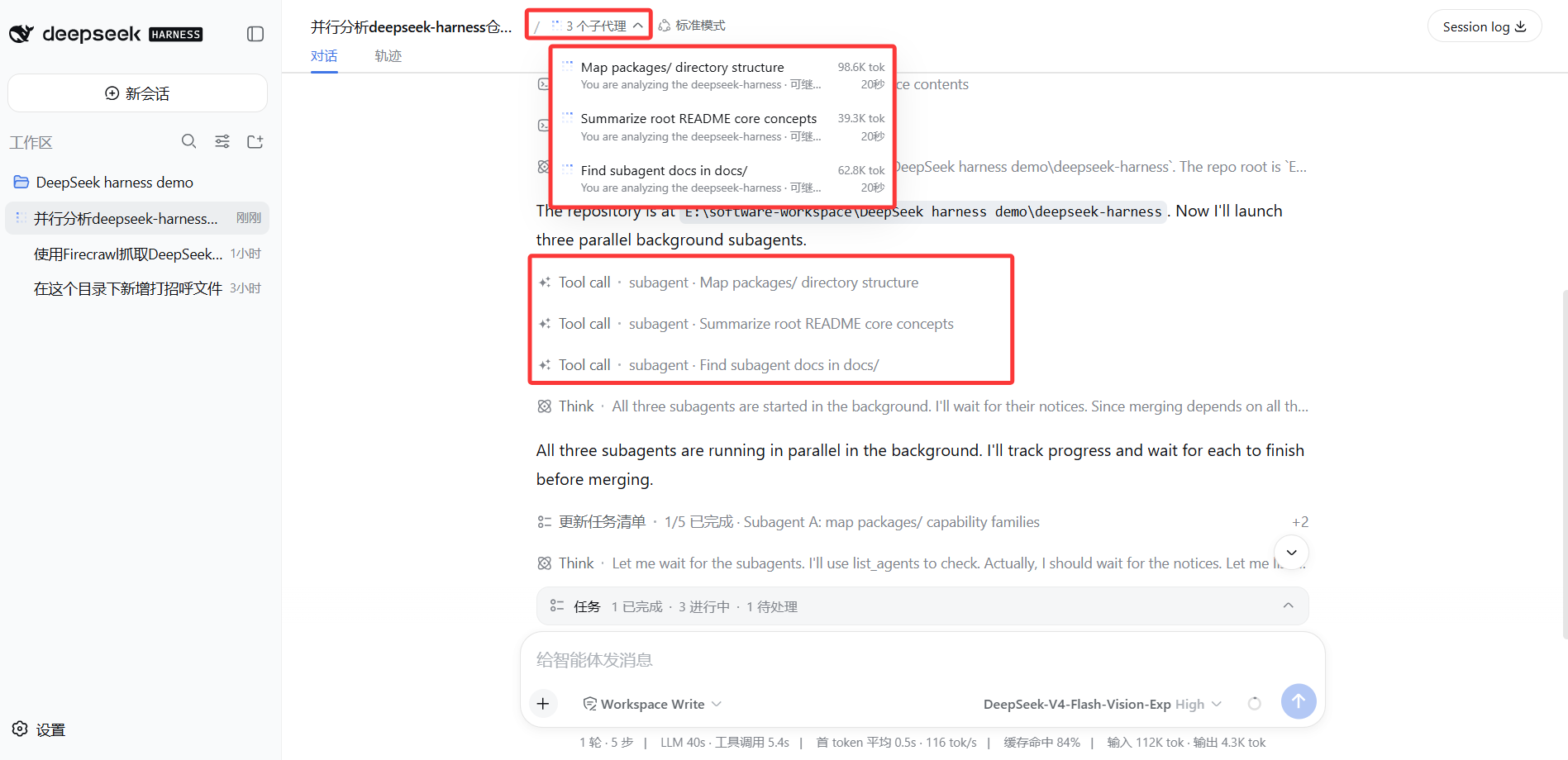
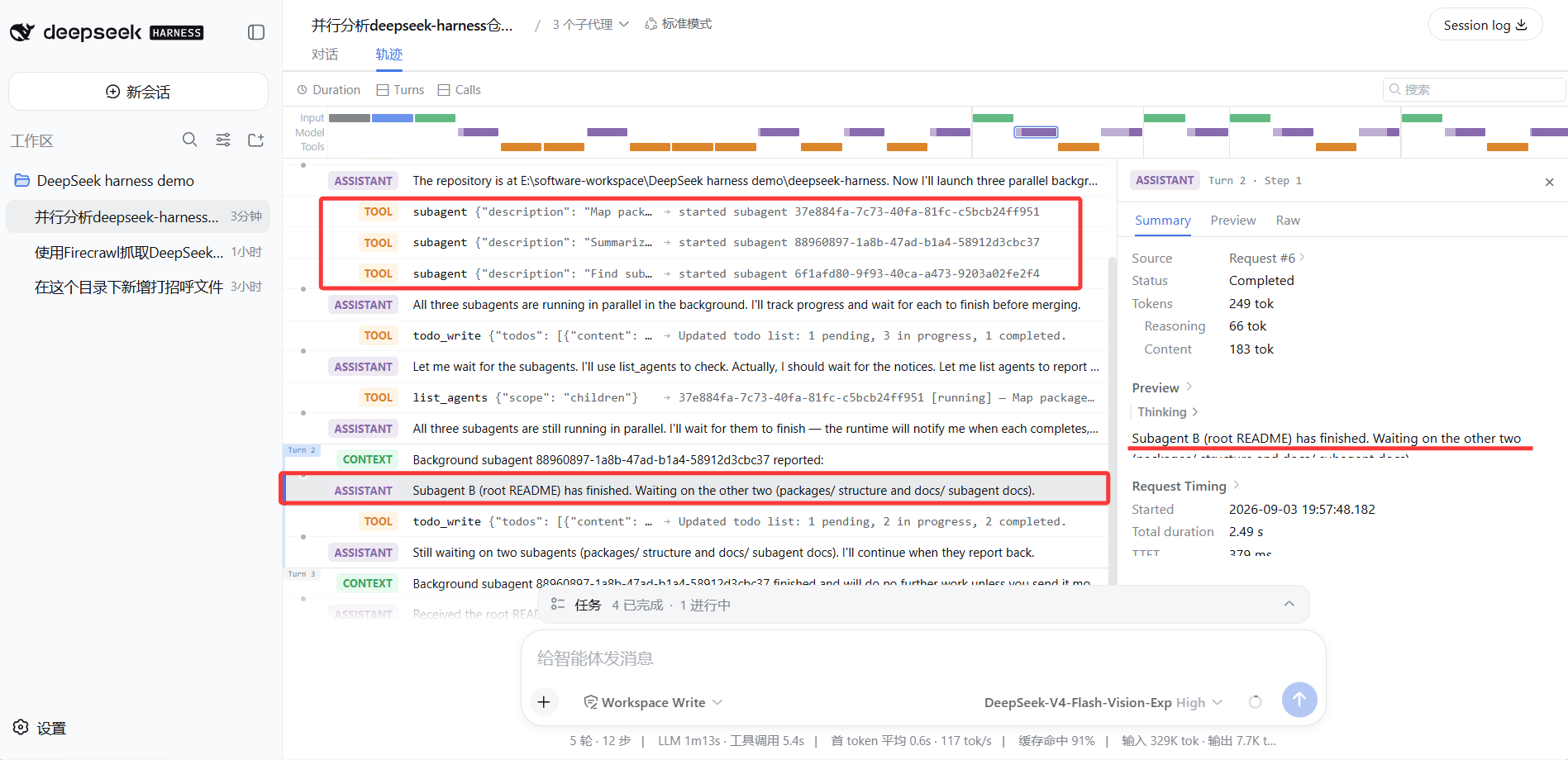
After sending, you can see in the conversation that the model makes several subagent calls in a row — that's it dispatching. In the default continuable mode, the model "first sends out the parallelizable ones together, then continues with its own work", rather than waiting for the first subagent to return.
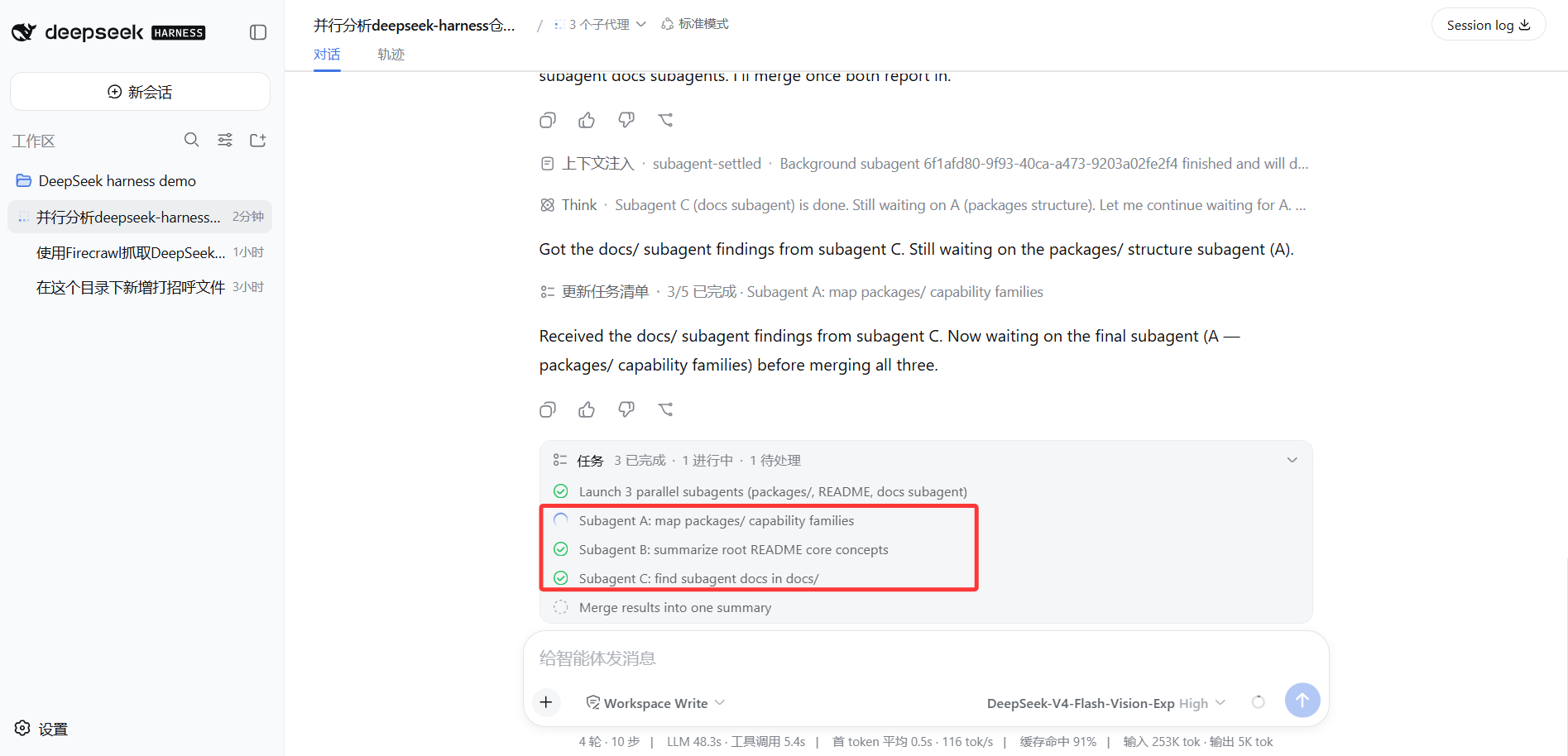
If some subagents finish earlier, that's fine — the main agent will keep waiting for the remaining ones, and only start merging when all are in:
Foreground / Background / Continuable: Three Run Modes
Subagents aren't just "dispatch and wait for the result". By "whether to wait, whether to keep talking" they split into three modes:
| Mode | When to use | What you see |
|---|---|---|
| Foreground one-shot | The next step must immediately depend on this result | Wait for the subagent to return the final text |
| Background job (one-shot background) | Don't need to wait, collect later | started background subagent job <id>, use job_output to collect, job_kill to stop |
| Continuable subagent | May need to send follow-up instructions, go back and forth | started subagent <childId>, can send messages later |
The default subagent is continuable mode: dispatched to run in the background by default, and the main agent does its own thing; when the subagent is done, a callback notification delivers "it's done, here's the result". The model only switches to foreground waiting when the next step really needs the result.
When you want more control over a continuable subagent, you need to turn on send_message (follow-up instructions), interrupt_agent (interrupt the current round, don't destroy, can resume), list_agents (list subagents and states). They're off by default because most scenarios don't need them — it's an "advanced capability, turn it on when you need it".
workflow and ralph: Two "Orchestration" Tools
Besides "split into pieces and run in parallel", dsh also has two more structured orchestration types, both plugins:
| Tool | What it does | Suited for |
|---|---|---|
workflow | Let the model write a small orchestration script, fan out sub-tasks with agent() / parallel() / pipeline(), and finally return a result | Large number of tasks, fixed structure, need precise control over execution order (e.g. analyze 10 documents at once) |
ralph | Each round swaps in a new subagent to advance the same goal, with a handoff report written at the end of each round for the next round | Multi-round refinement, easy to get stuck in a rut, creative or debugging tasks |
ralph is on by default (subagent uses spawn, max 64 rounds). workflow is off by default — its script runs in a separate thread, it's an "orchestration constraint" not a security sandbox, only worth turning on for clear batch scenarios.
::: tl;dr Daily parallel → subagent; To continue with previous conclusions → subagent_fork; Structured bulk → workflow (off by default); Anti-rut iterative refinement → ralph. :::
Common Pitfalls
| Pit | How to avoid |
|---|---|
| Multiple subagents writing to the same file at the same time | Parallel tasks should prioritize reads (search, analyze, review); for writes, let the main agent collect all results and write in one go |
| Forgot to say "wait until all done" in the instructions | Include the wait mechanism when dispatching, otherwise the main agent may start working with half the results |
| Tasks split too finely | Each subagent has startup overhead; splitting a 5-minute task into 10 subagents is actually slower; split down to "independently complete one meaningful thing" |
| Subagents nest infinitely | Delegation depth has a cap (default 3, 0 means forbidden); keeping a "main agent → subagent" star topology is the most stable |
What you learned in this chapter
You pass if you can complete the items below:
- [ ] State the three hard spots of single-Agent long tasks, and the core value of multi-Agent (context isolation)
- [ ] Know that subagents are also plugins:
ctx.subagentsis the delegation contract, spawn / fork are the two most commonly used backends - [ ] Distinguish
subagent(brand-new context) fromsubagent_fork(with the parent session's completed history) - [ ] Have run a "split tasks + wait for all done + merge results" parallel subagent at least once, and seen the subagent call in the Trajectory
- [ ] State the differences between foreground, background job, and continuable subagent modes
- [ ] Know what
workflow,ralph,send_message,interrupt_agent,list_agentseach do